May 31, 2007

Learn digital photography and creation of video from Adobe Digital Kids Club

Adobe Digital Kids Club provides tips and lessons of digital photography, video and multimedia presentations. You can learn about digital photography, creating Hollywood style video, story telling, tips for taking better photos or shooting great video etc from Kids Club.

The site makes it easy for teachers to introduce digital photography and video into the classroom. Here you'll find the essential digital photography, video, and imaging resources you need to engage students in learning while teaching them important digital communication skills. Teachers can also upload their lessons to Kids club.

Full information from Adobe

May 30, 2007

Access all your email through Windows desktop mail

Even though in beta stage, Windows live mail desktop is a good tool to access all your email – Hotmail, Yahoo mail or Gmail at one place.

Main features of Windows Live Mail desktop includes Access multiple e-mail accounts at one place, Preview messages in the Reading Pane, Drag, drop, and organize with one click, add photos directly to e-mail messages, and get newsgroup messages and RSS feeds delivered right to your in box.
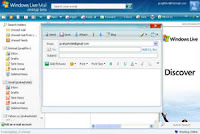
It is also safer by giving protection from phishing scams and virus scanning. You can block suspicious messages and destroy junk e-mail with a single click.

To configuring the client follow as described.

Download the software from Microsoft and install it. When ask for ‘login’ give your Hotmail address and password - That’s enough to receive your hotmail through Windows Live desktop mail – and finish installation.

To receive other email you need to configure it. For Gmail and Yahoo mail follow the steps below.(for Yahoo mail required premium account)

Open Windows Live desktop mail. From the tool menu select ‘accounts’> add > email account > next. (You can also select ‘Add an email account’ from the left window)

In the pop up window enter your name, email address and your email password on the specified boxes. Select ‘Manually configure server settings, and click next and follow as given below.

Incoming sever – pop.gmail.com [For yahoo (India) – pop.mail.yahoo.co.in]

Port – 995 – Check SSL box

Outgoing server – smpt.gmail.com [For yahoo (India) – smpt.mail.yahoo.co.in]

Port – 465 – check SSL box.

Click next and finish.

>>Wimdows Desktop mail

May 28, 2007

Make favicon with IcoFx and put it to your blog/site

Favicon is an icon file, which reflects the look and feel of a web site that allows the webmaster to further promote their site by creating a more customized appearance within the visitor's browser.

Here's an easy way to create a favicon for your site or blog. For favicon, a 16x16 pixel image with 256 color icon is desired. You can create any icon with IcoFX, a freeware icon editor. It is an all-in-one solution for icon creation, extraction and editing. It is designed to work with Windows XP and Windows Vista icons supporting transparency. You can convert your favorite images into icons, or icons into images.

Creating a favicon- Download the IcoFx icon editor, after installation open it and select ‘new’ from ‘file’ menu. In the dialogue box ‘new image’, select 256 color and 16x16 size. Now you can create your own icon from the tool menu according to your taste and choice and save it as ico file. To import an image for your icon, from the ‘file menu’ select ‘import image’ (remember that you need to crop or reduce the image size to 16x16 for better accuracy), and edit or save it as .ico file.

To put it in your blog/site just upload the icon file to ‘Google pages’ (every one can create Google pages with a Gmail account) or any other and note down the URL of the icon file.

To appear it on your blog/website, add the following two HTML tags to your web page in between
<head> and </head>
<link rel="icon" href="http://path of icon file" type="image/x-icon />

<link rel="shortcut icon" href="http://path of icon file" type="image/x-icon" />
For Example
<link rel="icon" href="http://your name.googlepages.com/icon file.ico" type="image/x-icon />
<link rel="shortcut icon" href="http://your name.googlepages.com/icon file.ico" type="image/x-icon" />


May 27, 2007

Yahoo Livesearch

Yahoo Livesearch, a new service from Yahoo, analyzes your search in real-time and instantly provides Web results with alternate search queries as you type. Still in developing stage, Livesearch looks things like your typing speed and spaces between search words to answer a query. As you continue to type each letter and word update the suggestions and Web results in real-time

Yahoo says Livesearch makes searching the Web faster and easier by predicting what you are searching for, suggesting alternate search queries as you type that help you focus your search, and providing relevant results in real-time. It is a big improvement on having to type one search after another to get the results you want.

To search, start typing a query into the search box and keep an eye on the suggestions that appear below. There is no search button as there is no click is required. Livesearch will suggest additional search queries and display them in the area immediately below the search input box. Visit Yahoo!

May 26, 2007

Make games for your Blog or Myspace

Pictogame is the first user generated games community built upon catchy interactive widgets. It provides users with a new way to express themselves and to communicate with fun. It is a unique place to create mini-games based on your digital pictures. In a few clicks, Pictogame enables you to make your own game widgets and share them easily by email, on your blog, on your MySpace profile, or on any social network.

It is an easy, free and fun service empowering everyone to become the game creators of tomorrow.

Surf faster than before

Everyone wants to surf faster, no matter whether they use a broadband modem or a slow dial up connection. The zero coast and easy way to attain an increase in speed is to hack your PC in a way to fine tune Domain Name System (DNS).

You may know what is DNS? When you type a URL of a website, the URL needs to be translated into a numeric IP address that Web servers and Internet routers can understand. Here the DNS server does the translation job. Normally your computer will automatically use the default DNS servers specified by your ISP, so you need not set up a DNS server. When you type an URL, for example, if a delay occurred in contacting the DNS server, or the DNS server takes too much time to analyze the address, you'll face a delay in getting to a Web site. So even if you use a fastest broadband, your Web surfing will be slowed down.

Here is a simple way to hack your PC to speed up your web surfing. Just visit OpenDNS that helps you navigate the Internet in a safer, faster, smarter and more reliable way. The service is free and requires nothing to download and is available for all operating system – Windows, Mac or Linux.

For a step by step description just visit Computerworld.com - (for Windows XP and Vista)


May 25, 2007

Metasearch engines

When search with different search engines often return different results for the very same query. As you know metasearch engines could search more than one search engine and directory for a query at a time. However, matasearch engines can’t provide every result from a search engine for a search term. Here printout three notable metasearch engines and their features.

Dogpile is built to give users the best search results available on the Web. This is accomplished by searching all the most popular engines and retrieving the best combined results. Once the results are retrieved, the innovative metasearch technology used by Dogpile goes to work removing duplicates and analyzing the results to help ensure the best results top the list.

Another search engine Aftervote with an AJAX backbone, provides additional details about each result such as Alexa ranking, Google Pagerank, domain age and more. It has a passive voting system like Digg and Shoutwire to search results without having to go through all that work of clicking buttons to vote.

VivĂ­simo is another metasearch engine originally founded by three Carnegie Mellon University scientists who decided to tackle the problem of information overload in web searches. They deployed a new technology to organize unwieldy search results in a completely innovative way with a mathematical algorithm.

An online time pass

Developed and maintained by Adam Lyttle, Mahjong Craving is an online game site for Mahjong- a puzzle game. The site offers a free Mahjong challenge every day. Each day a new Mahjong challenge will be randomly generated. You can play the latest challenge or you can browse through existing ones. Every time you play on Mahjong Craving you will notice that your time and attempts are automatically recorded.
A registered member can rate games difficulty level. The difficulty level of the game is the average rating given by all of the members. This means that real people have rated the difficulty of a game, not a computer!

May 24, 2007

Split Firefox Browser

Split Browser splits the content area of Firefox window as many as you like. It will help you in various cases, for example, to compare multiple web pages, but that depends on your system memory and your screen resolution. (More than four splitting makes Firefox unstable?)

You can select ‘split’ browser window from the context menu, Click popup-button on top/bottom/left/right edges of the content area or right click on a tab.

Split browsers can be closed by their close box from file menu-"File > Close All Split Browser" -closes all of them at once. Status of split browsers are saved, and automatically restored on the next startup

Google Hot Trend

Google has launched a new feature to Google Trends. The new service “Hot Trend” designed to provide instant insight into what people are searching for in different areas of the world. Currently testing on Google Labs, Hot Trends able to provide a snapshot of what's on the public's collective mind by viewing the fastest-rising searches for different points of time. The Hot Trends list is updated throughout the day and links to Google News, blog and Web searches so users can see why the search term made the list. Google is not simply listing the most popular search queries, but rather those that deviate from their typical frequency.

News from Betanews

May 22, 2007

Online Office Applications

One of the main drawbacks of online office applications is that potentially sensitive documents are stored on their servers. Even though they claim to have security features, we should take precautions while using online office applications. There are many online office applications Google doc, Thinkfree office and here is another one based on Ajax methodology -ajax13, an all in one application includes Write, spreadsheet, presentation, sketch etc. These applications requires Firefox version 1.5 or higher and works with any OS.

>>Ajax Write is a word processor that can read and write Microsoft Word and other standard document formats. It is designed to look like Microsoft Word, making it easy for anyone to start using it without needing to learn a new program

>> Ajax Presents is a presentation editor that lets you read, edit and save Microsoft Power Point files (.ppt) as well as Open Standard Presentation files (.odp).

>>Ajax Sketch is a drawing tool that provides a familiar environment for diagramming, creating flow charts, free hand drawing and more. You can perform functions such as resize, rotate, change background or pen colors.

>>AjaxXLS Viewer is a web-based spreadsheet viewer compatible with Microsoft Excel and Open Office allows ajaxXLS to preserve all your common cell formatting categories such as text styles, decimals, currencies, dates, and times as well as formulas.

All services are free and required registration with them and they also offer 1GB of storage space.

May 21, 2007

Draw a picture online and display it

Queeky is a web based drawing tool for those who like drawing and love to view sketches. You can send your favorite drawings as an e-card, and also, write a comment or vote to others drawings. Pictures that are painted on Queeky can be replayed by the visitors. So you have the possibility to check out how an interesting picture is made.

The new Drawing-Interface provides a lot of possibilities. Create a new drawing using a custom document-size. Zoom in up to 300% and drag the Stage with the Hand-Tool. Use Guides for better lay outing. Check the context menu above the Rulers, Stage and Drawing-Pane. Quick navigate with help of keyboard-shortcuts or upload a Background-Picture for Re-Painting.

May 20, 2007

Build and share gadgets, web pages, and applications

Popfly helps non-professional developers to build everything from Xbox games to Robotics to custom web applications using Windows Home server, a fun, free and easy way to build and share mashups, gadgets, web pages, and applications.

Popfly consists of two parts

(1) Popfly Creator tool- A set of online visual tools for building Web pages and mashups (web application that combines information from two or more websites) designed to create web experiences without being a programmer.

(2) Popfly Space - A social network designed to connect the millions of non-professional creators in the world who work on everything from mashups to game development to hardware hacks. Users can build and share projects using Popfly Creator.

Full details available at the following link - http://www.popfly.ms

May 19, 2007

Express yourself with ImageChef

Create your own custom images with ImageChef and emailed it as greetings, or used for decorating your blog or web site. Using ImageChef is simple. Select an image from the library (animated or still images are available in different category) Enter text to replace the text in the image. Click 'Preview' to view the new image with your own word. Then you can save it to your computer or email to a friend or get HTML code for your blog, Myspace or other sites to display.

Have a try at ImageChef

May 18, 2007

Disadvantages of prefetch in Firefox

Firefox, by default have a "prefetch" (or preloading) feature which is supposed to speed up the downloading of a site. When you open a web site in Firefox, it automatically start preloading (prefetching) all links contained in the background. So, when you click on a link, it can be load up quickly out of the browser's cache. More details about prefetching at prefeching FAQ

But, even though Firefox is programmed to stop prefetching as soon as a new request is initiated by the user (background download) it consume bandwidth, results in high data quantities that fill up the browser cache quickly and demanding high storage requirements in system RAM. So you need to have a clean caching policy for your web browser otherwise, you just lose all the advantages of Firebox’s speedy downloading of a site. And it is a known fact that, we are rarely visiting all the links in a site. So prefetching feature is generally having no use. So it is advisable to disable this function.

Open Firfox, type ‘about:config’ in address bar and press enter. Scroll down to ‘network.prefetch-next’; double click on it to set the boolean value to false.

May 17, 2007

Search copies of your content on the Web

Just enter url of your webpage and find who copied or quoted your content. Copyscape helping you fight against online plagiarism and content theft. Finds sites that have copied your content without permission, as well as those that have quoted you with Copyscape. They have free and paid services. The free service makes it easy to find copies of your content on the Web. Simply type in the address of your original web page, and Copyscape does the rest.


Want to help stop global warming?

The big culprit behind global warming is CO2. The less we create the better for the planet. If we all take a few simple steps to create less greenhouse gases, we can reduce the effects of climate change. Choose some actions that fit your lifestyle from Yahoo Green. Add to the tons of CO2 saved each year by Yahoos!

Visit Yahoo green

May 16, 2007

Record streaming audio

Record songs from an internet radio or any other sources are so easy with this free program. MP3myMP3 is very useful software which allows record anything playing on your computer. The software works directly with system sound card - if you can hear it, you can record it. Save this as MP3 or Wav file.

Installation is very simple and interface is pretty nice and there is no complicated configuration. After installation open it. You can see three options –Source, Settings and Browse. From ‘Source’ you can select a source record from. Select ‘Wave out mix’ to record all sound you hear (depending on your sound card). In ‘Settings’ option, you can adjust the bit rate and quality of your MP3. These settings applied when save recording to MP3 file.

Now just play a song, example from an internet radio, open Mp3mymp3, select ‘Wave out mix’ from settings and push ‘Record’ button. Adjust recording level. (Fine tunes your recording levels so that the meter on the right just hits the bottom of the red zone at the loudest point of the audio you are recording). Click Stop when you're ready to end the recording. Click the Play button to listen to your recording. Check your Mp3 Export settings and Save your recording to a Wave file or an Mp3 file or both.

Download MP3myMP3

May 13, 2007

A cool way to Search the web

Sputtr is a tool built from a collection of all favorite search engines like Google, Yahoo and all the social sites like Digg, Technorati, Reddit or Youtube that out there, that help you find things faster and only from places you want. Just enter the key word to search and select the service you want to find information. With a nice icons map interface, it is very simple and easy to search the web. www.sputtr.com

Yahoo updated its search engine

Yahoo updated its search engine with a new feature-adding image with the search results-like Google. Now it is possible to view thumbnails of image into the search engine result page, just like you’d do in any other shortcut provided by Yahoo, but, remember that it depends on your search term. The service uses Flickr to show image, so you might view the image uploaded on the service straight on the Yahoo search engine result page.

Source: softpedia.com

May 12, 2007

Developer Toolbar for Internet Explorer 6 and 7

Microsoft has released the final version of Developer Toolbar for Internet Explorer 6 and 7 which provides many features for exploring and understanding Web page. This add-on enables users to analyze the code of a web page by color coding the HTML source, matching CSS selectors to page elements, can modify the document object model of a web page, determine and indicate the specific elements on a web page, validate HTML, CSS, WAI, and RSS web feed links, Display image dimensions, file sizes, path information, and alternate (ALT) text, Selectively clear the browser cache and saved cookies and more.

Source: Betanews.com

May 11, 2007

New Opera comes with Speed dial

The most full-featured Internet browser on the market, the new Opera 9.2 comes with a new feature called ‘speed dial’ which allows you access the site quick faster than before.

And what is ‘speed dial’? When you load the browser, the new Opera provides you up to 9 screen shot of website we previously visited. When clicking any one of it loads quite fastly. It is just like that of bookmark a tool bar, but loads the site faster than that, and also you can refresh or change to any site as you like just right clicking on it.

Besides that it has BitTorrent, Improved rich text editing, Site preferences, allow you to add your favorite search engines, content blocker, thumbnail preview, Widgets, and also the old useful features like pop-up blocking, tabbed browsing, integrated searches, and advanced functions like Opera's groundbreaking E-mail program, RSS News feeds and IRC chat

May 9, 2007

Crazy idea

Amos latteier, called the “Best Fake Professor in Portland,” and a self-confessed lover of pigeons, made a battery out of 500 pounds of potatoes. Each potato generates about 0.5 volts and 0.2 mA current, he explains. Amos connected groups of potatoes in series to increase voltage, and then connected these groups together in parallel to increase amperage. The entire 500 pound battery generated around 5 volts and 4 mill amperes. He then hauled the battery onto a truck and drove it around town, powering a sound system off it.” Don’t eat potatoes after using them for a battery,” Amos advises.

Visit Amos latteier

Source Digit

May 8, 2007

A people Search Engine

Wink is a people search engine specifically target to find individual people who are active web and social network users. Wink search the public profiles on MySpace, Bebo, Friendster, LinkedIn, Live Spaces, and other sources. Wink gives you the most relevant and interesting results as found by people.

Wink also lets you create your own Wink profile. This enables you to be found in the Wink search engine (and other traditional search engines) and have control over what people know about you. The Wink profile allows you to control your name, location, description, and other contact information. It also provides you with the ability to promote and share links to the sites that you own or have a profile across the web. It can link to your MySpace, blog, Flickr photos, wish list, and other pages that you manage on various sites. This gives you the freedom to determine what people know about you and where you are on the web.

Windows XP hack

In Windows XP a performance gain can be achieved by disabling 8.3 name creations in NTFS system because it degrades the drive performance. If you have good reason to keep 8.3 naming convention, for example to use 16bit programs, you needn’t to do this. Otherwise disabling it will increase the performance of the system.

Open the registry editor by going to Start- Run-type ‘regidit’ and push enter. Expand HKEY_LOCAL_MACHINE\SYSTEM\CurrentControlSet\Control\Filesystem\NtfsDisable8dot3NameCreation. Set the value to ‘1’. Exit the registry and re boot the system.

May 7, 2007

An interesting way to explore the web

Explore the web by walking through the site by seeing a page and all links and its links visually. It is a fun and interesting way to explore the website. Have a look at: http://walk2web.com/

May 6, 2007

MP3 Search engine

MP3Realm is a search engine focused distinctively on audio in Mp3 format. It allows you to search for songs and clips, and filter them out by file duration. Your searches can be based on artist, title, genre or album.

You can listen or download the songs from here. The data base is not that much bad, for example when I search for songs of my local artist Sonu Nigam, I found around 20 of his songs here. Mp3Realm also index's lyrics, so you can sing along to your favorite songs. Indexing of mp3's is constantly updated with fresh links, and removes dead links.

http://mp3realm.org/

May 5, 2007

Trojan Horse deactivates Windows

Security Company Symantec recently (Apr 26/2007) detected a Trojan sample called as Trojan.Kardphisher which could deactivates previously activated copies of Windows. Even though the threat is low it affects Windows 2000, Windows 95, Windows 98, Windows Me, Windows NT, Windows Server 2003, Windows XP. After infection, when you boot or restart your PC the window appears as shown in the image (courtesy Symantec). You can only choose only Yes or No. You can't run Task Manager or any other applications. If you choose No your PC will be shut down immediately. If you choose ‘Yes’ you'll be asked credit card details for reactivate Windows.

The Trojan is not very technical - it's really just another classic social-engineering attack. What makes it interesting is that the author has obviously taken great pains to make it appear legitimate.

For full details visit Symantec

May 4, 2007

Yahoo lunched web based messenger like Google and MSN

Yahoo lunched web based messenger allowing conversations between users in the browser window. No need to install any software, users can talk from anywhere with their Yahoo ID or Live Messenger contacts (Google and MSN have already launched like services). The launch now comes with basic functions and users can use their image/avatar to display and the stealth settings and block list are in effect, but can’t modify.

You need flash player 9 installed and works with popular browsers like Internet Explorer, Firefox, or Safari.

Visit the link from here for more.

Click here for a summery of service

May 3, 2007

Google Romance- Does it works?

Google Romance, a beta product from Google Labs, uses most fashionable personal search algorithms to help you find your soulmate. You can post all types of romantic information here, and then send you both on a Contextual Date with so called ‘soulmate’ in exchange for showing highly relevant advertising. Does it work?

May 2, 2007

iGoogle - New brand for its personalized homepage

Google unveiled "iGoogle," a new brand for its Personalized Homepage service. Google's personalized homepage lets users to customize their start page for web browsing. Users can place gadgets containing information they like. They can add weather, stock feeds, and news feeds from Web sites, and even the current date and time. According to Google around 25,000 gadgets are currently available for the site.

The iGoogle name isn't exactly new, as developers of the feature originally planned to name the service as such before the idea was shot down by Google founders Larry Page and Sergey Brin. Instead, the service was relegated to more generic branding, but remained at the URL: google.com/ig.

More from: Beta news

May 1, 2007

David Pye’s site, where everything is free!

If you visit David Pye’s site, you should be fascinated by the contents. According to him everything here is completely free for the taking. He claims that “There are no pop-ups, no viruses, no webpage redirection and won't be begging for any of your money”!

Following are a few contents from his site. And of course there is lot more.

GoogleDavo- A mini Google earth- where you can type in almost any city and country in the world and see a detailed road map or satellite photo of the city.

Gif animation- Over 15,000, absolutely free animations for your website.

Web graphics - A tad over 29,000 absolutely free graphics for your website.

Desktop wallpaper- A tad over 7,000 (1024x768) wallpapers in 52 categories that you can use to spice up your computer screen background

Font - Over 3,650 assorted true type fonts to help jazz up your DTP, web pages, graphics projects etc.

Play games- Bored with surf in'? Got time to kill? Here are 101 assorted games to play online, and they're all free.

Trivia and Jokes- over 12,000 assorted facts, jokes and trivia.

The list is not ending. Visit his site for a free stuff
