June 30, 2007

Play thousands of free Sudoku Puzzles

Web Sudoku is one of the most popular sites for playing Sudoku games online. Launched in June 2005 by Gideon Greenspan and Rachel Lee, Web Sudoku has a very simple interface and contains billions of free Sudoku games to play. According to them, Web Sudoku's free online Sudoku puzzle is played by millions of visitors monthly.

Other popular features include the Daily Sudoku Variation (printable version for news papers) and Flash-based JigSawDoku.

Each Sudoku has a unique solution that can be reached logically without guessing. Enter digits from 1 to 9 into the blank spaces. Every row must contain one of each digit. So must every column, as must every 3x3 square.

June 29, 2007

Online photo editing - quick fix for your photos

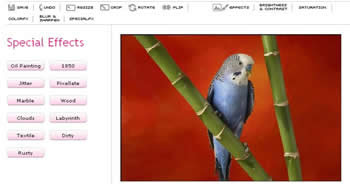
This online photo editing tool is appropriate for a quick fix for your photos. You can resize, crop or rotate photos, give some special effects like cloud, wood, oil painting etc, adjust brightness, contrast or sharpness and apply blur, sepia or grey scale to your photos are quite easy with Pixer.us.

With pixer.us you can edit your photos online using your browser. Upload photo using the "load image" form. In a few seconds, the image will be displayed on screen and you can start to play with it. After you're done fixing your photo click on the "Save" button to download it using your preferred file format JPEG, GIF, PNG and BMP.

June 28, 2007

Check your site’s popularity

Do you want to check link popularity of your site?
This online tool will help you. Just enter your URL and find out page ranking in Google, Yahoo, Alexa, or Technorati and social book marking site like del.icio.us and RSS subscribers (Bloglines, etc) and more.
Popuri is an online tool to check at-a-glance the link popularity of any site based on its ranking. Visit the site and enter your URL at: http://popuri.us/

June 27, 2007

What is Lua?

Lua is a new, powerful, fast and free scripting language which is used in many industrial applications like Adobe Lightromm and games like World of Warcraft.

The specialty about Lua is its simplicity and easy to learn and write code. It integrates with Java, C, C++, C#, Smalltalk, Fortran, Ada, and other scripting languages like Perl and Ruby. So it is easy to extend features of programs written in other languages.

Pronounced as‘loo-ah’, was developed at the Pontifical Catholic University of Rio de Janeiro in Brazil.

Lua was born way back in 1993 atTecgraf, the Computer Graphics Technology Group of PUC-Rio, and is now housed at Lablua. Both Tecgraf and Lablua are laboratories of the Department of Computer Science.

Lua is distributed in a small package that builds out-of-the-box in all platforms that have an ANSI/ISO C compiler. Lua runs on all flavors of Unix and Windows. For documentation and download, visit at: Lua.org

June 26, 2007

Google Preview


Do you want to see preview images (thumbnails) of web sites for your search?
This Firefox add on will help you. Google Preview Inserts thumbnails of web sites into the Google and Yahoo search results pages.
You can preview the site's home page before entering the site. However the preview images are not updated one.

June 24, 2007

Explore, Create and Share Color Themes

Creating your own color themes and share with others or use for your own project is interesting with Kuler.

Kuler is a technology preview from Adobe Labs. It helps you explore, create and share color themes for your creative projects. Use it as an on-line application or download themes to use with Adobe Creative Suite applications.

There are several ways to create a new theme. Click ‘Create’ shown at the left side of the screen. The default theme shows a set of colors that follow the analogous color rule.

You can make color themes either by changing all the colors together by moving the color markers around the color wheel, selecting another color rule or selecting the custom rule and use the color wheel or the sliders at the bottom of the screen to adjust colors independently and numerically.

You can add title, tag or description etc to your theme and publish to share with others. You can also search color themes of others by tag, title or by hex color values by entering the hex value in the search field (e.g.: FF0000).

For more information like- designate a base color, Adobe Swatch Exchange, use themes with Adobe Illustrator, Photoshop, or InDesign etc are available at the following address http://kuler.adobe.com/

June 22, 2007

Identify the color code of an image

Identifying the color code of an image on the screen is not an easy task. Usually it involves a multi step process and is time consuming. But this tool is able to find out HTML, RGB or HEX color of any pixel on the screen with just a single mouse click. This little tool is very useful for webmasters.

Instant Eyedropper is a free software tool which will identify the color code and automatically paste to the clipboard. Just Press and hold the left mouse button to the Instant Eyedropper icon in the system tray and move the mouse pointer to the pixel whose color you want to identify and Release the mouse button. The clipboard now contains the color code - in HTML format (or any other format that you have previously specified). It can be pasted and used in any text or HTML editor or the Color Picker tool of Photoshop.

Right click on icon to select the color format you want – HTML (e.g.: #FF00FF), HEX (e.g.: DB5D24) or RGB (e.g.: 22: 80: 220) etc. You can also select color code resolution, Auto copy color-codes to the clipboard and HTML color code customization (e.g. #AABBCC or #aabbcc etc.)

Supported color formats are HTML, HEX, Delphi Hex, Visual Basic Hex, RGB and HSB

Current Version: 1.75. Size: 375KB, OS: Windows NT, 2000, 2003 and XP.

Download Instant Eyedropper from - http://instant-eyedropper.com/
Related Posts:
  • Gradient studio-easily create colorful gradients
  • Pixeur - An essential tool for designers
  • Identify name of a color
  • Like our post? Become a feed reader of our blog and get updated automatically

    June 21, 2007

    Adobe Digital Editions- e-Book reader

    Adobe recently announced the release of Adobe Digital Editions (1.0) available for free download to Windows and Mac users. The application provides a new way to read and manage e-Books and other digital publications.

    The main interface provides two main views, reading view and library view. Reading view lets you read e-book, while library view allows you manage all your e-book collections.

    Digital Editions works online and offline, and supports PDF and XHTML-based content as well as Flash SWF for rich interactivity. You can view books in thumbnail or list view by title, author, publisher, etc and books can be viewed in double or single page views and can be enlarge any portion of the page for more reading experience.

    You can drag and drop files from the library into bookshelves section shown on left side of the main window to categorize books, magazine or make your own bookshelves

    For more information and install click here

    Check out the Adobe Digital Editions Library, where you can browse and download free e-Books and digital magazines. You will find a wide variety of books including full length novels and non-fiction in both PDF and XHTML format. There is also a sampling of excerpted books, containing one or two chapters.

    June 20, 2007

    Convert your RAW image to popular formats online

    This online tool is for digital camera owners. This is a free online utility that converts camera RAW format like CRW, NEF, RAF, CR2 or DNG to popular formats like JPEG, TIFF, PNG, GIF, BMP or TGA (More than 400 formats supported). It's the fastest way to resize and convert your pictures and images to any popular formats. You can apply rotation and some effects like grayscale, sepia or blur. Working is simple, upload your image files (size up to3mega pixel), select your out put format, choose some process to apply, select the file size click on OK, and you'll be able to save the picture on your computer.

    Visit the site from here

    June 19, 2007

    Largest Collection of Maps

    The Perry-Castaneda Library Map Collection (University of Texas Libraries) is a general collection of more than 250,000 maps covering all areas of the world. More than 11,000 map images from the collection are available online for printing. Many of the maps are included in their online catalog, UTNetCAT.

    The Perry-Castañeda Library, located on the University of Texas-Austin campus. The site also provides links to other site covering maps. Most of the images are JPEG images within the 200K to 300K range; however, some of the images are quite large. Maps are also available as PDF image to download.

    Most of the maps scanned by the University of Texas Libraries and served from the site are in the public domain. No permissions are needed to copy them. You may download them and use them as you wish. A few maps are copyrighted, and marked as such. For detailed information visit at: http://www.lib.utexas.edu/maps/

    June 18, 2007

    A Search Visualization tool

    SearchCrystal, an online tool that lets you compare, remix and share results from the Web, image, video, blog, tagging, news engines or RSS feeds and enables to see how your site is ranked in the search results of the major search engines and how best to support and enhance their site's web presence in terms of marketing and online advertising.

    Still in beta stage, the site makes it possible to explore and filter 50 - 500 web pages, images, videos, and blogs in a single display that guides toward relevant info in a structured way. Information most likely to be relevant is placed close the display center

    SearchCrystal also offers you a powerful competitive intelligence tool. You can embed it as a Widget on your site or blog to share personalized crystals, or use it to find out what is popular on Wikipedia or use the Search Analytics Toolbox in your browser as a powerful competitive intelligence tool.

    For a try and details visit Searchcrystal

    June 17, 2007

    Flickr Search Engine

    It’s very interesting to find photos from Flickr with Flickrleech - a search engine that searches by date, username, user ID, by favorites, by photo set, group pool or by simple search. It pulls public photos from Flickr's streams through calls to the Flickr API. If you search by date, it will pull all 500 images for a given date. All other queries or searches will presently return the first 200 results.

    Related articleAlternative search for Flickr

    June 16, 2007

    Convert your photos and video to AVI, FLV and MPEG

    Converting your photos and video to AVI, FLV and MPEG is easy with Foto2Avi software. It is ideal for Youtube videos or presentation videos.
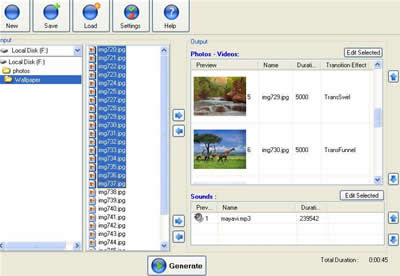
    It is a freeware basic video/photo converter and also a video editor too and has special effects like-transitions, basic effects like brightness/noise/fade in/fade out, advanced effects like distort, ripple, animations, subtitles and logos. All effects are highly customizable. It support external audio sounds [mp3/ogg/wav] and you can edit your sounds synchronize them with your videos. You can save your work in ‘.f2a’ project files so you cannot lose your work and reload them later.

    Input Files: AVI, DivX, JPG, MP3, OGG/OGM, PNG, WAV, XviD

    Output Video Files: AVI, FLV, MPG and XviD

    How to use the software?

    àAfter installation, press the 'Settings' button to choose your video settings (input and output) and save.

    à Click on ‘new’ button. Select your photos or videos that you want to add on your clip from the left pane window. Then select files by dragging and then click on ‘right arrow’ button.

    àSelect the sounds that you want to add on your clip (if any).

    àSelect individual file (or all files) to give effects likes transition, logo, sub title, animation etc. by click on ‘edit selected’ button.

    à Press the 'Generate' button in order to preview your result and press the 'Gear' button to produce your video.

    File size 10Mb. Publisher:Trustfm

    Download the software

    June 15, 2007

    Convert any Video in to DVD

    Converting any video format in to DVD is very simple with this free, simple, yet powerful software DVD Flick. It is an open source, powerful DVD authoring tool which supports most of the video formats like AVI, MPG, MOV, WMV, ASF, FLV, Matroska and MP4.

    You can add or edit title, subtitle, combine one or more video sources or add another audio track to the movie is quite easy with this software. A complete work flow is also available with the software. So it is quite easy to understand how to add title, format selection, encoding, burning etc.

    Download the software from http://www.dvdflick.net/download.php

    June 13, 2007

    Old is Gold- See Photos of Early 1900

    Shorpy - the 100 year old photo blog - contains photos of early 1900. The site is named after Shorpy Higginbotham, a boy who worked in an Alabama coal mine near the turn of the century.
    Every photo is wonderfully titled and year of taking is also mentioned along with the title. See the photos from this link-Shorpy

    June 10, 2007

    See Sun rise and Sun set in Real time on your Computer

    Stellarium is a free open source planetarium for your computer. The software renders realistic skies in real time just like what you see with the naked eye, binoculars or a telescope. It is being used in planetarium projectors.

    Computer with reasonable configuration should be able to run Stellarium. It supports Linux, Windows and Mac. Installation is just like regular software. After installation run the software.

    1. Set your location first (default location is Paris, France). You can click on your location on the map in the configuration window (Select ‘configuration window’ menu from the screen below left side), or enter coordinates manually and save the changes by clicking "set as default". From now on, the sky will look exactly as it looks where you live when you run Stellarium. If you take Stellarium along on a trip with a laptop, you will need to adjust your location of course.

    2. Use the mouse or arrow keys to look around.

    3. Use the page up and page down keys to zoom in and out.

    4. Use the left mouse button to select an object, the right button to deselect the object and middle mouse button or spacebar to center on the selected object.

    Version- 0.90. File size 16.5 Mb

    Download the software from here

    For full details about installation and configurations click here.

    To know more about Stellarium visit Wiki.

    June 9, 2007

    Download and listen podcast

    Want to listen to internet audio programs but can't when they are scheduled? This program lets you create your own custom online audio anytime, anywhere. Juice is free, open source software, lets you select and download shows and music and play whenever they want on their iPods, portable digital media players, or computers

    Technically Juice is a Media Aggregator, a program that allows you to select and download audio files from anywhere on the Internet to your desktop. Juice has a built-in directory with thousands of listed podcast (broadcasts created and stored digitally on the Internet) feeds and has auto cleanup, authentication, centralized feed management and much more. It supports multiple media players also.

    Once you've installed Juice, you can select podcasts to subscribe to in two different ways, either clicking the selection button to see a directory of available podcasts or enter a URL for a podcast you've found on your own. You can set the scheduling options so that Juice scans for new downloads as often as you like, or you can control it manually. When it is done downloading new files, it adds them to your library.

    Download Juice

    June 8, 2007

    Experiment with this Relaxing music and Sleep-aid

    Engaging in a relaxing activity such as reading, meditation, yoga, or listening to music, before going to bed, can help you to get a good night sleep. Listen to such music will certainly help relief from stress.

    You can experiment with this online program to create your personal sleep-aid or relaxation tool. The free relaxing music and nature sounds on this website have been carefully chosen for their ability to aid sleep, reduce stress, and provide a relaxing atmosphere for activities such as yoga, tai-chi, and meditation. They provide description about the ability of sound found on this site to reduce stress or promote good sleep.

    For example,

    1.Rhythmic drumming creates a hypnotic effect to help induce sleep.

    2.The sound of the vibraphone is calming, and may reduce stress.

    3.The sound of steady, rhythmic ocean waves provides a sensation of relaxation and calm.

    4. Rain acts as a white noise machine that masks household noises such as refrigerators, heaters, and creaking floors…and more

    They also give some good tips for sound sleep. For example, reading, meditation, yoga, or listening to music, before going to bed and perform this activity in a dimly lit, stress-free environment. A regular routine helps to promote quality sleep.

    Have a try at Sound sleeping

    June 7, 2007

    Browse through Photoshop tutorials to learn cool tricks and enhance your skills

    Browse through the archive of Photoshop, Corel Painter, and Paint Shop for tips and tutorials and learn cool tricks and enhance your skills. This is the site where you can learn remarkable tips about using your graphics programs.

    All tips and tutorials are described in detail and quite easy to understand and are free for personal use. Just visit the site and learn Photoshop and other graphic programs and enhance your skill.

    McCannas home page

    Photoshop tips page

    June 6, 2007

    Online Office Suite

    There are many online office applications available like Google doc, Thinkfree office, Microsoft office online, Writely etc. and all have their own features. Zoho is another web-based office application suitable for small businesses and has all of the applications available like word processor, spreadsheet program, presentation package, e-mail, calendar, note book, etc.

    Zoho have good features, for example, Zoho writer is an online word processor with collaboration features - can save and export files to many formats, including Word doc files, Rich Text Format (RTF), text files, PDF, HTML, the Open Office SXW extension and Open Document’s ODT format. Like Google Docs, Zoho Writer can publish items directly to blog.

    Zoho Notebook, another feature, allows users to create, aggregate and collaborate on multiple types of content online and integrates with all of the other Zoho applications, so users can do their word processing within the notebook page framework. Zoho offers free and premium packages of its services.

    Visit Zoho for more details

    June 5, 2007

    The upcoming Firefox 3 will support offline web application

    The upcoming Firefox 3 will support offline web application that enables users to access service or website even from offline without any internet connection. As per the news from Macworld.com, ‘when Firefox 3.0 is released later this year, the open-source browser is likely to contain a host of new features, including offline support for Web applications and new bookmark and search features’. Recently Google unveiled like service (in developing stage) ‘Gears’- an open source browser extension for enabling offline web application which will be able to create web applications that don't need a constant Internet connection to work. Firefox 3.0 is likely to be released in the second half of 2007, bringing a lot of new features bundled in the browser. Read more at Macworld.com

    Acronym dictionary

    Instant Message (IM) and emails are popular among friends to convey messages. To write message quickly and fast we use acronym, for example U for you. The AIM acronym dictionary
    may be useful for all of you and it has the most common abbreviations that you (U) might come across while IMing with your friends. Good luck (GL) and have a nice day (HAND).


    June 2, 2007

    Web Software from Google That Runs Offline

    Google unveiled a web software that runs both online, and offline, marking a big change for the Internet industry. It would allow users to manipulate Web services like e-mail, online calendars or news readers whether online, or offline.

    The technology, called Google gears , is an open source browser extension for enabling offline web applications. Now developers will be able to create web applications that don't need a constant Internet connection to work. There are like software available, but will be able to make limited searches offline, since they will have downloaded data automatically when connected. Google's full web search functions would return once the user reconnects to the web.

    Google Gears provide three key features - A local server, to cache and serve application resources (HTML, JavaScript, images, etc.) without needing to contact a server, a database, to store and access data from within the browser, and a worker thread pool, to make web applications more responsive by performing expensive operations in the background

    Google Gears is currently an early-access developers' release. If you wish to install Google Gears on your computer, visit the Google Gears Home Page. Please note that Google Gears is not yet intended for general use.

    To learn more about Gears click here
    Source: tech2.com

    June 1, 2007

    Download and watch Youtube video

    UltraGet Video Downloader is a free tool that allows you to easily download and play media content from streaming websites like Youtube. Just copy and paste the video URL in the left pane of the window and press the Download button. It has an internal FLV player which enables you to easily enjoy the downloaded flash videos offline. It is a good tool for those having slow internet connection to view You Tube video.

    Software supports Windows 2000, XP and Vista and 5MB in size.

    Download from http://www.ultraget.com/


    A new way to search the web

    Zuula- a different search engine - provides the results from your favorite search engine like Google, Yahoo, MSN or Alexa unaltered, you can check those first and then get results from other search engines simply by clicking on their tabs. You can switch back and forth between search engines for results by clicking the tab. It says that ‘search engines often return very different results for the same terms. So checking multiple search engines will give you the best results’, and Zuula makes it easy. Currently, it offers Web, Image, News, Blog, and Job searches