FREE International Calls to Any Phone from Google Talk using Talkster
This service is especially beneficial to areas with strictly regulated VoIP and telecom practices, such as India and United Arab Emirates, using Talkster through GTalk2VoIP will let people communicate freely between mobile phones, landlines and PCs, even in countries not currently supported through Talkster’s ad supported free calling service. To start, launch Google Talk on your desktop
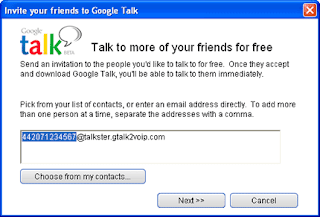
1. Add contacts the same way you usually do: click on the Add button to add a friend
2. Type in the phone number of the person you want to call in the following format.
Use full phone number, including country code and area code (Example: for UK, use 442071234567@talkster.gtalk2voip.com)
3. You’ll get a confirmation from Talkster with instructions. Talkster assigns a local Talkster number for your friend in their country. Your friends will use Talkster phone numbers to call-in to be connected with you.
4. If you are calling your friend on a mobile phone, he will receive an SMS with his Talkster call-in number for you. Otherwise, let him know the Talkster number by IM or email. (Source)
>>More details here
. Read full story .
Wednesday, July 02, 2008 | 2 Comments
Google translator script for messenger plus
This script simply translates what you wrote in your chat window when you press the F5 key. You can translate in every language available at Google translation services page.Press F7 to setup, Press F8 to show incoming message translation, Press F5 to translate your message. Download
. Read full story .
Wednesday, March 12, 2008 | 0 Comments
Google Talk Chatback Widget for your blog
Google has released a new widget -Chatback Badge that allows your blog/site visitors to chat with you, whenever you're signed in to Google Talk. All you need to copy and paste a piece of small code in to your blog or site.With this chatback badge anyone can chat with you even if they haven't signed up for Google Talk or a Google Account. The badge will display your online status (whether you're available to chat or not) and, optionally, your status message. You can also change the title of your badge, and control whether you want to show or not your online status.
To create a Chatback badge, you need to be a Google Talk user and will need to be online and available (with a green ball next to your name) in Google Talk to enable people to chat with you.
[source-blogoscoped]
. Read full story .
Tuesday, February 26, 2008 | 0 Comments
Record your VoIP conversations
HotRecorder for VOIP is an advanced tool that lets you to easily record, play, store and convert voice communications held over the Internet through programs like Skype, AIM, Yahoo Messenger and GTalk. It is a perfect tool for podcasting, online journalism, conducting business, and much more. The features includes - converts the PRS proprietary format into MP3, WAV or OGG files, voicemail for GTalk and Skype, allows additional Emotisounds, uses new technology to encode the file so you may store, share, and search recordings in your play list, etc.
Track - imessenger
. Read full story .
Wednesday, January 09, 2008 | 0 Comments
YM-Online-Status plug-in - displays the status of Yahoo Messenger
Track: Messenger.es
. Read full story .
Monday, December 31, 2007 | 0 Comments
Add New Emoticons and Sound to Google Talk with Gplus
Gplus allows you to express emotions through the various emoticons while chatting and, like smiley emoticons you can also send emoti sounds from a bank of sounds that further enhance your chatting experience.
>>Requirements- Windows XP with the Microsoft .NET 2.0 framework
>>Latest version – 2.0, File size – 4.9Mb to download
>>Track - imessenger
>>Other stories Related to Instant Messenger (IM)
New to here? Subscribe to Techrends for upcomming stories
. Read full story .
Friday, December 28, 2007 | 0 Comments
Fix8-Interactive communication tool
This interactive communication tool is free (basic version) and required Windows XP/Vista and USB webcam.
For full details and download click here
. Read full story .
Wednesday, December 12, 2007 | 0 Comments
Download Yahoo Messenger Skin
In addition, to enhance your chatting experience, there are several other items like sound, buzz system, etc available for the application

Download it from Yahoo
. Read full story .
Thursday, September 27, 2007 | 0 Comments
Acronym dictionary
. Read full story .
Tuesday, June 05, 2007 | 0 Comments
Yahoo lunched web based messenger like Google and MSN
Yahoo lunched web based messenger allowing conversations between users in the browser window. No need to install any software, users can talk from anywhere with their Yahoo ID or Live Messenger contacts (Google and MSN have already launched like services). The launch now comes with basic functions and users can use their image/avatar to display and the stealth settings and block list are in effect, but can’t modify. You need flash player 9 installed and works with popular browsers like Internet Explorer, Firefox, or Safari.
Visit the link from here for more.
Click here for a summery of service
. Read full story .
Friday, May 04, 2007 | 0 Comments
Web-Based Google Talk – No need to download
Google updated the instant messaging client Google Talk and made it accessible through a web interface without having to download or install any application. This version of the instant messaging client allows you to chat with your friends or with your Gmail contacts and offers videos or photo previews in chat. The new edition of Google Talk is based on the recently introduced gadget that allows users to add the instant messaging client straight on their Personalized Homepage.
. Read full story .
Thursday, April 05, 2007 | 0 Comments
New Skype Goes Beyond Voice
>SkypeFind recommends your favourite local businesses to your friends and the Skype community. It lets users to rate, review and log their favourite businesses no matter where they live.
>Skype Prime allows earning money by offering advice to Skype users. It brings together those people who have expertise or knowledge to sell with others who are seeking advice and pay for it.
Main features of Skype 3.1 are:
1. Make free Skype-to-Skype calls to anyone else, anywhere in the world.
2. Call ordinary phones and mobiles at pretty cheap rates per minute.
3. See who you are talking to with video calls.
4. Send SMS messages to friends on the move.
5. Set up call forwarding so you never miss another call.
6. Group chat with up to 100 people or conference call with up to nine others.
7. Search the web with the Google Toolbar
. Read full story .
Thursday, March 15, 2007 | 0 Comments
Yahoo bridges email and IM
Google released a similar feature for GMail last year, but it seems like Yahoo is doing it a little bit smoother.
The company said that for the coming months, Yahoo! will activate this feature for users of the new version of Yahoo! Mail, which is in beta phase but available to all users of the service. In a statement, John Kremer, Vice President, Yahoo! Mail, said that they are bringing the fun of instant messaging into the e-mail experience. It is about bringing to the masses choices on how they communicate. They are hopefully bridging the gap between email users and IM users, as there is still a chunk of Yahoo! Mail users who are not using IM.
Meanwhile, the beta version of Yahoo! mail, which is a free service, offers a number of improvements over the current version, including a more agile interface based on
. Read full story .
Wednesday, February 21, 2007 | 0 Comments


