Sylpheed - lightweight and user-friendly e-mail client for Linux
Sylpheed adopts 3-paned display similar to some popular e-mail clients for Windows, such as Outlook Express, Becky!, and Datula. The interface is also designed to emulate the mailers on Emacsen, and almost all commands are accessible with the keyboard.Currently implemented features are:
- Unlimited multiple account handling
- Thread display,Filtering
- MIME (attachments), built-in image view
- X-Face support, External editor support
- Message queueing, Draft message function
- Line-wrapping, Clickable URI
- XML-based addressbook
- LDAP addressbook, Jpilot addressbook (for Palm types handhelds)
- Newly arrived and unread message management
- Multiple MH folder support
- Mew/Wanderlust compatible key bindings
- News reader function
- Printing, UIDL support
- APOP authentication, SMTP AUTH support
- IPv6 support, GPG encryption and signature
- Autoconf, automake support
- Support of i18n of messages by gettext
- Supports many locales, including UTF-8 (Unicode), when using libjconv
- IMAP4 compliant
[source]
. Read full story .
Sunday, June 22, 2008 | 0 Comments
Fedora Liveusb Creator – For Installing Live OS on to USB flash drive
Features of Liveusb Creator: - Completely non-destructive install. There is no need to deal with formatting or partitioning your USB key.
- Supports downloading various Fedora releases, including Fedora 9
- Automatically detects all of your removable devices
- Persistent storage creation. This lets you to allocate extra space on your USB stick, allowing you to save files and make modifications to your live operating system that will persist after you reboot. This essentially lets you carry your own personalized Fedora with you at all times. (Note: only works with Fedora 9)
- SHA1 checksum verification of known releases, to ensure that you've downloaded the correct bits
. Read full story .
Sunday, June 15, 2008 | 0 Comments
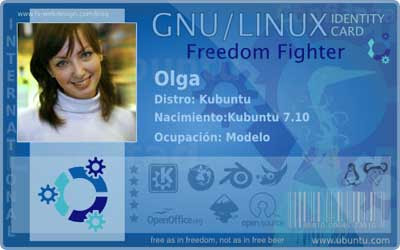
Make your own Gnu / Linux Identity Card
This is a set of predefined cards that can be configured to exactly with your picture and your data and that can be print on paper, but if you can in a plastic would be much better because it seemed more real.The designer is Fabian Flores who has made these cards, which are really supported by Ubuntu and you can configure to your liking. There are several types of cards, but to customize your own, you have to use Gimp.
The steps are as follows:
>> Download the card that you liked from F-webdesign and decompress the file
>>With Gimp follow the steps below:
1) adjusts the image to use as a photo of the ID with a resolution 148px by 148x and save
2) Open the image "Ubuntu ID Master"
3) Now insert the picture you created for ID.
4) Use the text tool to create the text layers
5) save preferably in PNG.
Download [source]
. Read full story .
Saturday, May 17, 2008 | 0 Comments
Gnash - Flash movie player for Linux
With growing support for SWF v8 and v9, Gnash also supports many GNU/Linux distributions, embedded GNU/Linux, FreeBSD, NetBSD, OpenBSD, non x86 processors, and 64 bit architectures.Following are some of the features Gnash
- Gnash can run standalone to play flash movies.
- Run as a plug-in from within most Mozilla derived browsers, such as Firefox.
- Gnash can play many current flash movies (swf7+).
- Supports viewing of streaming video from popular video sharing sites like YouTube.com.
- Gnash also supports an XML based message system as documented in the Flash Format specification.
- It uses OpenGL for rendering the graphics on the desktop and AntiGrain (AGG) for embedded frame buffer only devices results high quality video
- Gnash supports extending Action Script by creating your own. You can write wrappers for any development library, and import them into the player.
[source]
. Read full story .
Wednesday, March 12, 2008 | 0 Comments
GLabels - For editing labels and cards from Linux

The editor is fairly simple to operate and tools like rich text, lines, squares, rectangles, images and bar codes, etc makes our works in a precise manner. Another interesting feature of this program is to create a template and generate different labels from a CVS file with the data, which would save the time.
It is designed to work with various laser/ink-jet peel-off label and business card sheets that you'll find at most office supply stores.
gLabels is free software and is distributed under the terms of the GNU General Public License
Download
[source]
. Read full story .
Tuesday, March 04, 2008 | 0 Comments
Vixta – Windows Vista style Linux Operating System
As you can see from the screenshots, the system has a desktop very similar to that of Microsoft Vista; therefore it is very useful for those who like Vista desktop for their Linux distro, even though there are slight changes in Vista icons, widget and explorer.Official site / Installation Guide
Download
File size:704Mb(ISO)
Download / Installation Guide
. Read full story .
Sunday, March 02, 2008 | 0 Comments
UNetbootin- Installing Linux over the internet
Unlike Wubi / Lubi, UNetbootin will create a partitioned dual-boot system as though you installed with a CD. At the same time Wubi installs the OS to a loop mounted file system and create no partition so dual booting is not possible.
This kind of application is suitable for those who want to install a Linux distribution but don't have a CD-R to burn, lack a CD writer, or they want to install on a computer that doesn't have a CD-ROM drive, like an ultra-portable laptop.
UNetbootin uses a Windows or Linux-based installer to install a small modification to the boot loader (bootmgr and bcdedit on Vista, grldr and boot.ini for NT-based systems, grub.exe and config.sys for Win9x, or grub on Linux), uses the bootloader to boot the netboot initrd and kernel, then uses that to download and install Ubuntu directly from the internet, no CD required. After GNU/Linux is installed, the modification to the bootloader is then undone.
Requirements:
- Linux, or Microsoft Windows 95-Vista
- A broadband internet connection (dial-up will take way too long to download)
- 3GB or more of spare hard drive space to install the Linux distribution in
More details and installation procedure available here - here
Track – Linux.com
. Read full story .
Friday, January 25, 2008 | 0 Comments
Entertainer – Media center solution for Linux
Entertainer is a Media center solution for Linux that allows playing your favorite tracks, navigating music by artist, album, and genre or making your own play lists. Entertainer also automatically downloads album art and lyrics of the tracks, supports themeing which make your media center look just like you. Even though still under heavy development stage, Entertainer aims to be a simple and easy-to-use media center solution for Gnome and XFce desktop environments. You can access the source code from Google code.
Track - bitelia
. Read full story .
Tuesday, January 15, 2008 | 2 Comments
Access Linux Partition from Windows

You will have full access to your Linux partitions from Windows, allowing both reading and copying files. Further more, Windows will now be able to handle floppy disks or thumb drives which have been formatted with an Ext2 file system.
The Ext2 Installable File System software package is distributed as a single executable solution complete with all of the features. It is a setup wizard which installs and configures the Ext2 file system driver.
. Read full story .
Monday, January 14, 2008 | 0 Comments
Goodbye Vista - KDE 4.0 arrived with new capabilities
The KDE Community has released the 4th major version of the K Desktop Environment on 11th Jan 2008. This release marks the beginning of the KDE 4 era.KDE is one of the most popular desktop environments on GNU/Linux platform available for free and offers much more options and freedom than Windows or Mac.
The new KDE 4 Desktop has gained some major new capabilities like the Plasma desktop shell that offers a new desktop interface - a panel, a menu and other intuitive means to interact with the desktop and applications.
KDE's proven window manager-KWin, now supports advanced compositing features. Hardware accelerated painting takes care of a smoother and more intuitive interaction with windows.Track- efytimes
. Read full story .
Saturday, January 12, 2008 | 0 Comments
What is wine?
Wine is made to run a handful of windows programs on top of Linux operating systems. It is completly an Open Source implementation of the Windows API.
Wine is a compatibility layer for running Windows programs and does not require Windows, as it is a completely free alternative implementation of the Windows API consisting of 100% non-Microsoft code; however Wine can optionally use native Windows DLLs if they are available.
Wine provides both a development toolkit for porting Windows source code to Unix as well as a program loader, allowing many unmodified Windows programs to run on x86-based Unixes, including Linux, FreeBSD, and Solaris.
For more details click here. Read full story .
Friday, April 20, 2007 | 0 Comments