Photo Black & Color is a portable tool that allows you to make a partial de-saturation (as shown the screenshot below) on a picture by selecting the colors you want to preserve.
The partial desaturation is the fact of protecting a colored subject and of leaving the rest of the image grayscaled.
Showing posts with label photo editing. Show all posts
Showing posts with label photo editing. Show all posts
August 1, 2010
July 22, 2010
Get ACDSee 8 Photo manager for free
Filed in:
giveaway,
photo editing
 ACDSee Photo manager (current version 12) is a very efficient, comprehensive application that offers everything you need to manage your shots. You can view, manage, edit, and burn the photos or images with this application.
Moreover, it also have a Quick Search bar, support for full IPTC metadata, photo captioning, create VCD slide shows, and have Photo Repair Tool that able to remove flares, lens scratches and fix red-eye.
Features of ACDSee 8 Photo Manager:
- - Organize pictures into a photo album
- Create inspiring Flash slide shows, screen savers, or on-line photo albums
- Share photo albums with friends and family online or by e-mail
- Burn photos to CD or DVD and create backups
- Getting photos with download images from digital camera, scanner, mobile phone, or other removable device and capture images
- Viewing images and media files
ACDSee 8 Photo Manager normally cost $49.99 for purchase. Now you can get it free by just registering at here. Download ACDSee 8 Photo Manager at here and activate it. Enjoy!
April 14, 2008
BadPeggy - helps you search damaged JPEG files
Filed in:
photo editing,
Software
Bad Peggy is a free application for Windows that searches for damaged JPEG files and will validate and verify pictures for truncation and other blemishes which sometimes occur when such files are getting downloaded or restored from bad backups. It's quite useful and saves you time, for example you required opening the file up in Photoshop to check the image which is very tedious task.
Download / Homepage
It's quite useful and saves you time, for example you required opening the file up in Photoshop to check the image which is very tedious task.Download / Homepage
March 27, 2008
Adobe Photoshop Express - Free online photoshop version
Filed in:
Adobe,
photo editing,
Photoshop
Adobe has released Adobe Photoshop Express, an online version of Photoshop that allows you to edit, publish and share your photos in image galleries for free. It is made with the help of Flex, the Adobe framework for creating Rich Internet Applications.You will be able to upload photos and organize them in albums. Also you will get 2 GB of free storage space for your photos . As compared with the desktop version Photoshop, Photoshop Express has only a few features, but they are enough to enhance your photos online. The tools available with this application is able to remove red-eye, auto correct images, perform various tuning actions like highlight, sharpen, white balance, focus and apply effects. [source:softpedia]
As compared with the desktop version Photoshop, Photoshop Express has only a few features, but they are enough to enhance your photos online. The tools available with this application is able to remove red-eye, auto correct images, perform various tuning actions like highlight, sharpen, white balance, focus and apply effects. [source:softpedia]
January 29, 2008
70 Horror, Blood and Gore Photoshop Effects and Brushes
Filed in:
photo editing,
Photoshop
Want to create horror effects using Photoshop? At Photoshoproadmap, you can see special brushes and list of Photoshop tutorials filled with gore, splatter and blood.
Some previews have been blocked just because the final effect was too explicit. Have some fun with your photos, but don’t scare your kid brother too much, please.
January 27, 2008
MotionDSP – Improves quality of Videos and Photos.
Filed in:
photo editing,
Software,
Video
MotionDSP is a great application that dramatically improves quality of video or photos taken by a range of sources, including mobile phones, digital cameras, and security cameras.
See the example below, which shows images that have been taken with low quality, which after having gone through MotionDSP greatly improves their quality and resolution (just move the mouse over the image). The software is able to perform the task like enriches the color, repairing some lost details, correct lines, etc.
The company offers its multi-frame video enhancement in software products for video forensics, and a scalable web service for carriers and social networking sites which can process tens of thousands of user-generated videos per day.
More details available here
More examples here
Track - Incubaweb
See the example below, which shows images that have been taken with low quality, which after having gone through MotionDSP greatly improves their quality and resolution (just move the mouse over the image). The software is able to perform the task like enriches the color, repairing some lost details, correct lines, etc.
The company offers its multi-frame video enhancement in software products for video forensics, and a scalable web service for carriers and social networking sites which can process tens of thousands of user-generated videos per day.
More details available here
More examples here
Track - Incubaweb
January 26, 2008
Make Reflection to image
Filed in:
online Generator,
photo editing,
Reflection maker
 PicReflect is an online reflection maker that allows us to add reflection to our image with a few simple steps. You only need to select like reflection size, opacity level for the reflected image, transparency level and background color.
 December 29, 2007
Add watermarks to your photos
Filed in:
online tool,
photo editing
Do you want to protect your copyright or want to add comments to your photos? Here is very simple way. PicMarkr is an online tool which lets you to add custom watermark (image or text) to your images and it is free.
The service is fast and flexible and you can upload 5 files at a time and a maximum size of 25Mb.
License: Free
Track: wwwhatsnew
September 29, 2007
Online photo editor- apply 1000s of digital photo effects
Filed in:
online tool,
photo editing

FlauntR is a free online photo editor and effects software. FlauntR aims to make photo editing easy enough to be done by anyone, without having to buy expensive software, or downloading bulky applications with cumbersome installation procedures, or have to learn complex editing tools.
Get images directly from Flickr or your PC. Apply 1000s of digital photo effects to your images with just one click. Use the online photo album feature for photo storage, and access your albums online. Share your creations by email; edit pictures online for embedding on your web page and blog. With flauntR you can apply cool digital frames and effects to your photos, for communities like Facebook or MySpace.
License - free
August 13, 2007
Image Search by Feeling Words
Filed in:
photo editing,
Search engine

The number of images on the internet is getting bigger and bigger these days. There are many image search engine to find photos on internet like Google image search.
Feel image is a new image search engine which is not just a key words search engine. It makes possible to show images by color orders you feel. It’s corresponding 127 colors, and has a technology that quantifies colors like ‘red’ ‘blue’ in images. And also have a technology that quantifies time like ‘spring’ ‘summer’ ‘morning’ ‘noon’ etc. So you can search phrases like “red flower in spring”.August 12, 2007
Turn your ordinary photos into masterpieces
Filed in:
online tool,
photo editing
Cellsea is a simple online photo editor which has everything you need to complete the most common photo tasks! Quickly rotate, resize, and crop photos to get the exact composition and size you need. There are over 15 ways to correct color, exposure, and lighting problems. With this flexible tool, you can  change the corrections to suit your tastes.
change the corrections to suit your tastes. This free tool can turn your ordinary photos into masterpieces by using oil, Mosaic, Flare and more! You can also add professional-looking blur effects to your photos. Choose between Gaussian, Motion, Radial Blur, and more!
You can upload files from your PC, from Image URL, or by searching on the web (powered by Google)
Supported file format: jpg, gif, png, bmp, tiff, fpx and pnm.
License: Free.
Maximum file size: 10MB.
August 3, 2007
Advanced web-based image editor
Filed in:
online tool,
photo editing
Fauxto - perhaps the world's most comprehensive, feature-laden, web-based image editor has many advanced features. Its interface is similar to Photoshop. You can edit or enhance photos, create logos or make button with Fauxto.
You can add different ‘Layer’, text, many filter effects like emboss, grayscale etc to image – that is more options to enhance your photos. Cropping an image, adjusting canvas size and image resizing are also simple to do.
Presently Fauxto accepts JPEG, PNG, GIF, BMP, and TIFF images via 'Open Web Image' in the 'File' menu for editing. You can save your image to PNG or JPEG that is the limitation and the site is still in beta stage.
July 29, 2007
Print large wall poster as big as your wall
Filed in:
online tool,
photo editing,
wallpaper
If you want to print a large wall poster as big as your wall, naturally it is not possible with your A4 size printer. But, you can slice the image in to different A4 size parts and then stack them together to get a larger image, but the process is not as easy as it say.

Here is a simple solution. Just enter the site Blockposters.com, upload an image and select how many pages wide you want your image to be (Depending on your wall size). The site then cuts your image in to pieces and creates a PDF file that can be downloaded. The process is very fast and free.
Print out all images from the PDF file to make different parts of your image and combine them all to make a big wall poster.
The site allows a maximum of 1Mb file size to upload. So, if you want to upload larger image cut them in to pieces before upload.
If you like to make such a big wall paper just looks at the site from here.
July 21, 2007
Make your own photo album
Filed in:
photo editing,
Software
Photozig Albums is the complete easy and free solution for managing digital photos and slideshows. You can organize your photos into albums and create slideshows with photos and MP3 songs. E-mail pictures to your friends and family, create photo galleries or blogs on the Web for free, and make CDs with slideshows and music. You can also make even screensavers.
Alternative Link:

Let Photozig Albums make every picture look perfect with Red-eye correction, cropping, and "Quick Fix" to correct brightness/contrast/levels to produce a great photo. To add sound (MP3 or WAV) click on ‘Play slide show’. From the slideshow click on ‘option’ (shown on upper right corner)- ‘sound tracks’ –‘ Manage music’ – ‘Add sound’.
File size:8.33Mb.
Alternative Link:
June 29, 2007
Online photo editing - quick fix for your photos
Filed in:
online tool,
photo editing
This online photo editing tool is appropriate for a quick fix for your photos. You can resize, crop or rotate photos, give some special effects like cloud, wood, oil painting etc, adjust brightness, contrast or sharpness and apply blur, sepia or grey scale to your photos are quite easy with Pixer.us.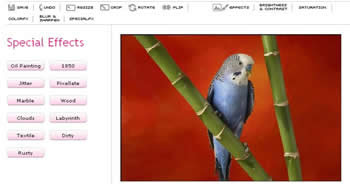

With pixer.us you can edit your photos online using your browser. Upload photo using the "load image" form. In a few seconds, the image will be displayed on screen and you can start to play with it. After you're done fixing your photo click on the "Save" button to download it using your preferred file format JPEG, GIF, PNG and BMP.
June 16, 2007
Convert your photos and video to AVI, FLV and MPEG
Filed in:
photo editing,
Software,
Video,
Youtube
Converting your photos and video to AVI, FLV and MPEG is easy with Foto2Avi software. It is ideal for Youtube videos or presentation videos.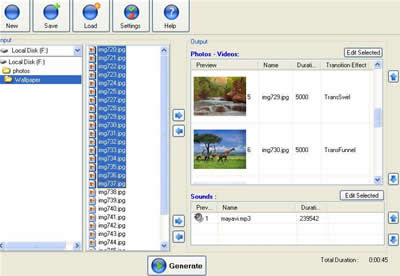

It is a freeware basic video/photo converter and also a video editor too and has special effects like-transitions, basic effects like brightness/noise/fade in/fade out, advanced effects like distort, ripple, animations, subtitles and logos. All effects are highly customizable. It support external audio sounds [mp3/ogg/wav] and you can edit your sounds synchronize them with your videos. You can save your work in ‘.f2a’ project files so you cannot lose your work and reload them later.
Input Files: AVI, DivX, JPG, MP3, OGG/OGM, PNG, WAV, XviD
Output Video Files: AVI, FLV, MPG and XviD
How to use the software?
àAfter installation, press the 'Settings' button to choose your video settings (input and output) and save.
à Click on ‘new’ button. Select your photos or videos that you want to add on your clip from the left pane window. Then select files by dragging and then click on ‘right arrow’ button.
àSelect the sounds that you want to add on your clip (if any).
àSelect individual file (or all files) to give effects likes transition, logo, sub title, animation etc. by click on ‘edit selected’ button.
à Press the 'Generate' button in order to preview your result and press the 'Gear' button to produce your video.
File size 10Mb. Publisher:Trustfm
May 21, 2007
Draw a picture online and display it
Filed in:
Internet,
photo editing,
web 2
Queeky is a web based drawing tool for those who like drawing and love to view sketches. You can send your favorite drawings as an e-card, and also, write a comment or vote to others drawings. Pictures that are painted on Queeky can be replayed by the visitors. So you have the possibility to check out how an interesting picture is made.

The new Drawing-Interface provides a lot of possibilities. Create a new drawing using a custom document-size. Zoom in up to 300% and drag the Stage with the Hand-Tool. Use Guides for better lay outing. Check the context menu above the Rulers, Stage and Drawing-Pane. Quick navigate with help of keyboard-shortcuts or upload a Background-Picture for Re-Painting.
May 19, 2007
Express yourself with ImageChef
Filed in:
photo editing,
Photoshop
 Create your own custom images with ImageChef and emailed it as greetings, or used for decorating your blog or web site. Using ImageChef is simple. Select an image from the library (animated or still images are available in different category) Enter text to replace the text in the image. Click 'Preview' to view the new image with your own word. Then you can save it to your computer or email to a friend or get HTML code for your blog, Myspace or other sites to display.
 Have a try at ImageChef
April 29, 2007
Mix up your photos
Filed in:
Internet,
photo editing
 >>Mixercast allows you to mix your photos, videos or sound to create embeddable player to display them. The output can be email to friends, post it directly to your MySpace Blogger or take the embed code to paste it on your own webpage. If you have a lot of images to share this are a fun and easy way to do it.
 >>With pre-made templates, it is quite easy to build Mixercast. After uploading your images, drag and drop them were you want to be in. The site will currently allow you to upload from your computer, download pictures from a stock photo site, Flickr, and record a video with your webcam. You can also upload video from YouTube, MySpace.
Visit the site Mixercast
Source downloadsquad
April 22, 2007
Online Photo Editing Made Fun
Filed in:
photo editing
 Picnik is an online photo editing tool. With Picnik you can quickly edit all your online photos from one place. You can import photos from Picasa, Flickr, from your computer from a web URL, or from your web cam. Editing is very easy and fast, fix underexposed photos, remove red-eye, or apply effects to your photos. After editing you can save the photo to your computer, Picasa or Flickr. It supports JPG, PNG, BMP and TIFF image formats. Just have a look at www.picnik.com
Subscribe to:
Posts (Atom)