Windows 7 uses its own DirectShow filters for decoding audio and video formats. You can’t use third party filters without making changes to the Registry.
Preferred Filter Tweaker for Windows 7 is a freeware tool that lets you use third party filters like ffdshow, CoreAVC, DivX , Cyberlink, etc with just a few mouse clicks. And of course the changes can be always undone.
Showing posts with label Windows. Show all posts
Showing posts with label Windows. Show all posts
September 21, 2009
August 23, 2008
Free E-Book Windows Vista The Pocket Guide and Windows Vista Customization Manual for Download
 If you are using Windows Vista operating system, these two e-books helps you a lot in improving your system. Windows Vista - The Pocket Guide’ covers the basics of customizing, improving, and organizing your Windows Vista machine.
‘Windows Vista - Customization Manual’ covers the basics of customizing your computer. Learn how to customize your boot screen, login screen, desktop, start menu, Windows Explorer, and much more.
If you likes to download this e-books, you will need to register on the forum created by Rich or to subscribe to his RSS feed.
August 21, 2008
Explorer++ - Feature rich File manager
Explorer++ is a feature rich file manager for Windows XP and Vista. It is just like Windows Explorer but have several enhancements and improvements for a richer file browsing experience. Explorer++ is fast and light in terms of resources and there is no installation required. Explorer++ is a freeware and provides features like tabbed browsing for easy management of multiple folders, display window shows previews of images as they are selected, customizable user interface, browse both real and virtual folders, full drag-and-drop support with other applications, including Windows Explorer, advanced file operations such as merging and splitting supported, easy-to-remember keyboard shortcuts for quick navigation, etc for file browsing in Windows.
The application still in Alfa stage, you can download (220Kb) it from here.
Explorer++ is a freeware and provides features like tabbed browsing for easy management of multiple folders, display window shows previews of images as they are selected, customizable user interface, browse both real and virtual folders, full drag-and-drop support with other applications, including Windows Explorer, advanced file operations such as merging and splitting supported, easy-to-remember keyboard shortcuts for quick navigation, etc for file browsing in Windows.The application still in Alfa stage, you can download (220Kb) it from here.
August 9, 2008
Microsoft’s New Start Menu for Windows XP and Vista
Work faster and with less frustration is the main intention behind this program. This application, Speed Launch, gives you lightning quick access to all the documents, files, and websites you use often. In the past when you used something a lot you might have created a desktop shortcut, added it to your IE favorites, or placed it on your quick launch bar. Speed Launch allows you to create centralized shortcuts to all the stuff you need and allows you to access them effortlessly.
 Speed Launch is an application launcher that extends the functionality and usability of Microsoft Windows. With Speed Launch, users can select their own words to open frequently used websites, documents, and applications. The most compelling feature of Speed launch is the use of a drag and drop interaction model to make this advanced functionality more intuitive to novice computer users.
More details available here
Requirements:Windows Vista or Windows XP SP2 with .Net Framework 3.0
Limitations: English only
Last updated: 07/31/2008
File size: 2.7Mb / License: Free
>>Download
Speed Launch is an application launcher that extends the functionality and usability of Microsoft Windows. With Speed Launch, users can select their own words to open frequently used websites, documents, and applications. The most compelling feature of Speed launch is the use of a drag and drop interaction model to make this advanced functionality more intuitive to novice computer users.More details available here
Requirements:Windows Vista or Windows XP SP2 with .Net Framework 3.0
Limitations: English only
Last updated: 07/31/2008
File size: 2.7Mb / License: Free
>>Download
August 8, 2008
FREE Microsoft Office Outlook Connector 12.1 for Download
Microsoft released the latest version of Microsoft Office Outlook Connector (v.12.1beta). This free application enables you to use Microsoft Office Outlook 2003 or Microsoft Office Outlook 2007 to access and manage your Microsoft Windows Live Hotmail or Microsoft Office Live Mail accounts, including e-mail messages, contacts and calendars for free!
Outlook Connector enables you to use your Live Hotmail accounts within Outlook:
Outlook Connector enables you to use your Live Hotmail accounts within Outlook:
- Read and send your Office Live Mail/Windows Live Hotmail e-mail messages.
- Manage your contacts in Windows Live Hotmail.
- Use advanced options for blocking junk e-mail messages.
- Manage multiple e-mail accounts in one place.
- Manage, and synchronize multiple calendars, including shared calendars to Windows Live Calendar from Outlook.
August 6, 2008
Free Windows Home Server 120-Day Evaluation Kit with FREE international Shipping
With Windows Home Server you can back up all of your family’s PCs automatically. You can connect, organize, and share your photos, videos, music, and other files with friends and family. Windows Home Server completes an image-based back up of every home computer every day, so you can restore a single file or an entire PC
Windows Home Server kit includes the following items:
Windows Home Server Installation DVD, Windows Home Server Connector CD and Home Computer Restore CD

Windows Home Server kit includes the following items:
Windows Home Server Installation DVD, Windows Home Server Connector CD and Home Computer Restore CD
Order the free Windows Home Server 120-Day Evaluation Kit today. Microsoft will ship it to you free of charge
(source)
August 1, 2008
Free e-book Windows Vista Performance and Tuning from Microsoft helps you run Vista faster
 The free e book ‘Windows Vista Performance and Tuning’ from Microsoft helps you make your Vista Operating system run faster and more responsive. Windows Vista focuses on delivering greater performance and overall system responsiveness. By striking a balance between speed and responsiveness, Windows Vista delivers a level of performance that has the greatest positive impact on the system’s usability.
This e-book looks at the following areas of performance improvement:
1. Making configuration changes that help a computer feel more responsive when you use it.
2. Using hardware to boost the actual physical speed of a computer.
3. Making configuration changes that help a computer to start faster.
4. Making the computer more reliable may help increase performance.
5. Monitoring performance occasionally so that you can stop problems before they get too big.
Download the free e-book
May 26, 2008
HashTab – Allows to easily verifying the integrity and authenticity of files
HashTab is a Windows shell extension which adds a tab called "File Hashes" to the Windows Explorer file properties.
You may find that many download sites list the MD5 hash along with the download link which is used to verify the integrity and authenticity of that file. The HashTab makes it very simple for Windows users to check these hashes on any file on the system without using external tools. The tab contains the MD5, SHA1 and CRC-32 file hashes. These are common hashes that are used to verify the integrity and authenticity of files.
This application supports Windows 2000, 2003, 2008, XP, and Vista
Download latest version from here.
You may find that many download sites list the MD5 hash along with the download link which is used to verify the integrity and authenticity of that file. The HashTab makes it very simple for Windows users to check these hashes on any file on the system without using external tools.
The tab contains the MD5, SHA1 and CRC-32 file hashes. These are common hashes that are used to verify the integrity and authenticity of files.This application supports Windows 2000, 2003, 2008, XP, and Vista
Download latest version from here.
May 25, 2008
Document for comparing key features of Windows XP SP3 and Vista SP1
Filed in:
Windows
Microsoft has recently published a document which is useful to compare key features of two operating systems - Windows XP SP3 and Vista SP1. In 28 pages it deals with the issues of security, management, deployment, mobility and productivity and for each feature or capability, each section compares key Windows Vista advancements against Windows XP.
The document is limited to a brief statement and those wants to know more, and then there is enough technical information on TechNet and MSDN site.
Download documents in PDF / XPS
In 28 pages it deals with the issues of security, management, deployment, mobility and productivity and for each feature or capability, each section compares key Windows Vista advancements against Windows XP.The document is limited to a brief statement and those wants to know more, and then there is enough technical information on TechNet and MSDN site.
Download documents in PDF / XPS
May 23, 2008
How to hide personal partition of your hard disk?
Filed in:
Tips and Tricks,
Windows
There are lots of methods to protect your personal files from private access, for example, by using software like folder lock, or by hiding folders, etc. but if you have thousands of confidential files or folders to hide, selecting and hiding every folder would be time consuming. The easiest way is to hide the particular hard drive that has your confidential files.
To do this we can use TweakUI, one of Microsoft’s Power Toy that allows to access system settings that are not available in Windows XP default user interface. With a few click we can hide a particular drive easily.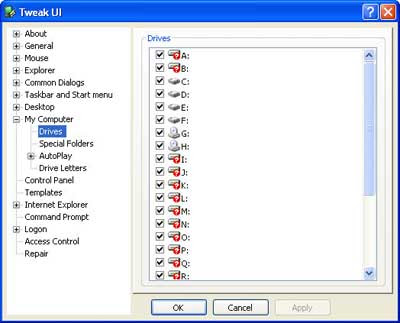 Download the app and install it. Run TweakUI, go to “My Computer - Drives“, and uncheck the drive that you want it to be invisible and click “Apply”.
It will be disappeared immediately. To access your hidden drive again, just type the drive letter in address bar.[source]
Download TweakUI
To do this we can use TweakUI, one of Microsoft’s Power Toy that allows to access system settings that are not available in Windows XP default user interface. With a few click we can hide a particular drive easily.
Download the app and install it. Run TweakUI, go to “My Computer - Drives“, and uncheck the drive that you want it to be invisible and click “Apply”.It will be disappeared immediately. To access your hidden drive again, just type the drive letter in address bar.[source]
Download TweakUI
May 13, 2008
vLite – Makes Windows Vista run on computers with less memory
Vlite allows you to create a custom installation of the Windows Vista operating system like nLite for Windows XP. As we know, Windows Vista takes lot of resources and required a reasonable system to operate it. vLite provides you with an easy removal of the unwanted components before installing the OS in order to make Vista run faster and to your liking. This tool doesn't use any kind of hacking, all files and registry entries are protected as they would be if you install the unedited version only with the changes you select.
vLite has lot of options. You can remove programs and applications and even implement simple "tricks" to improve the stability and functionality of Windows Vista. The usage of this program is recommended for all those who want to streamline Windows Vista to make it work on old computers with little RAM.
Main features of this application are:
[source]
This tool doesn't use any kind of hacking, all files and registry entries are protected as they would be if you install the unedited version only with the changes you select.vLite has lot of options. You can remove programs and applications and even implement simple "tricks" to improve the stability and functionality of Windows Vista. The usage of this program is recommended for all those who want to streamline Windows Vista to make it work on old computers with little RAM.
Main features of this application are:
- 1. hotfix, language pack and driver integration
2. component removal
3. unattended setup tweaks
4. split/merge Vista installation CDs
5. create ISO and burn bootable CD/DVD
[source]
May 12, 2008
Vistalizator - Change display language in all Vista editions
Vistalizator is a free tool that allows you to change display language in all Vista editions (32 bit / 64bit). This software is particularly useful, if for example, you buy a Vista laptop from abroad and want it to talk to you in your mother language.
Features of this application includes
First of all download Vistalizator (File size: 412Kb)
Download Language packs
32 –bit Vista RTM / 32-bit Vista SP1 / 64-bit Vista RTM / 64-bit Vista SP1
>>Unpack Vistalizator (ZIP) to some destination - no need to install
>> Run Vistalizator, open downloaded language pack, press Install
>> Restart Vista [source]
Features of this application includes
- Change Vista display language in less than 5 minutes!
- Uses official Microsoft language packs
- You can install all 35 languages and switch between them easily
- Works in 32-bit Vista
- Works in 64-bit Vista
- Compatible with Vista Service Pack 1
- User Account Control (UAC) compliant - prompts for administrative privileges
- No file is overwritten/changed during language installation - except for language upgrade after Vista SP1 installation
First of all download Vistalizator (File size: 412Kb)
Download Language packs
32 –bit Vista RTM / 32-bit Vista SP1 / 64-bit Vista RTM / 64-bit Vista SP1
>>Unpack Vistalizator (ZIP) to some destination - no need to install
>> Run Vistalizator, open downloaded language pack, press Install
>> Restart Vista [source]
May 7, 2008
Microsoft Official downloads for Windows XP SP3 standalone update package and ISO images
Filed in:
Windows,
Windows XP
 Microsoft has released Windows XP Service Pack 3 (SP3) to the public through Windows Update and Microsoft Download Center, after a slight delay. The SP3 was delayed due to a bug in Microsoft Dynamics Retail Management System (RMS).
Although downloads are available on Automatic Updates, people who want to download the standalone package can use following official links to download SP3
(Supported Operating Systems: Windows XP Home Edition; Windows XP Professional Edition; Windows XP Service Pack 1; Windows XP Service Pack 2)
>>Windows XP SP3 exe file (342.9Mb)
>>Windows XP SP3 ISO Image (544.9Mb)
>>Windows XP Service Pack 3 Network Installation Package(316.4Mb)
(source)
May 5, 2008
Windows SteadyState – Bring back your computer in its original state
Managing a computer that is used by more than one person can become a tedious job, especially if users have access it without too much knowledge just tear up everything - installing applications, accessing malicious sites that sends viruses to our computer, etc .. Windows SteadyState is free application from Microsoft that allows us to manage these computers and return them to their "original state". This application is the successor of Shared Computer Toolkit, a tool that already exists, to which added several new options.
This application allows us to manage various user profiles, changing its configuration to limits accessing certain options, such as the control panel or management network, etc.
Once you've made these blockades will facilitate computer back to the original state, by simply restarting, but we can also define how long the changes will be kept on disk. For example, a computer room could be reset every time you have new students.
Windows SteadyState work with Windows XP with SP2 installed and download and use are free.(source)
Download
Windows SteadyState is free application from Microsoft that allows us to manage these computers and return them to their "original state". This application is the successor of Shared Computer Toolkit, a tool that already exists, to which added several new options.This application allows us to manage various user profiles, changing its configuration to limits accessing certain options, such as the control panel or management network, etc.
Once you've made these blockades will facilitate computer back to the original state, by simply restarting, but we can also define how long the changes will be kept on disk. For example, a computer room could be reset every time you have new students.
Windows SteadyState work with Windows XP with SP2 installed and download and use are free.(source)
Download
April 14, 2008
TrayIt – Windows Task bar space saver
 TrayIt is a small, free utility for Windows that will save your precious Taskbar space for minimized windows. When application's window is minimized, TrayIt represents the application on the Taskbar with icons instead of the regular minimized rectangle.The application is particularly useful for background tasks you typically keep running on your PC all day long like your favorite E-mail client, Real Player, etc.
There are three ways to TrayIt to minimize any window to the task bar:
1- By right clicking on the minimize button in any window, and clicking on "Place in System Tray"; place an icon on the taskbar
2 - Press the Ctrl button and click the button to minimize any window
3 - A simple right-click on the button marked "X" (close) from any window.
TrayIt runs on Windows XP, Vista 2000, and requires no installation
License- Free / File size- 209Kb / Download / Home page
March 5, 2008
Internet Explorer 8 beta 1 has been released for download
Microsoft has decided to distribute the first beta version of Internet Explorer 8. At present it can be installed on Microsoft Windows Vista Service Pack 1 (SP1), Windows Vista, Windows XP Service Pack 2 (SP2), Windows Server 2008 and Windows Server 2003 Service Pack 2 (SP2). Following are some features revealed in internet explorer 8 - Activities, WebSlices, Favorites Bar, Automatic Crash Recovery, and Improved Phishing Filter.
Activities allow users to send web content via the internet to find the online service better known. For example, you can select a physical address of a restaurant and with only two clicks to see a map without having to leave the same site.
WebSlices allows users to crop a specific area section of a site and bookmark it. Automatic Crash Recovery will help to avoid losing information. It recovers your tabs if your browser crashes.
[However, I can’t download it, think that we have to wait some more time to download it ]
(via Genbeta) Download
Following are some features revealed in internet explorer 8 - Activities, WebSlices, Favorites Bar, Automatic Crash Recovery, and Improved Phishing Filter.Activities allow users to send web content via the internet to find the online service better known. For example, you can select a physical address of a restaurant and with only two clicks to see a map without having to leave the same site.
WebSlices allows users to crop a specific area section of a site and bookmark it. Automatic Crash Recovery will help to avoid losing information. It recovers your tabs if your browser crashes.
[However, I can’t download it, think that we have to wait some more time to download it ]
(via Genbeta) Download
February 22, 2008
Database of Windows exe programs
Filed in:
Windows
ExeLib is a database for Windows process information, where you can find information like the name of an exe file, its description, its effects, its risk factor, and some other information also.
The main usage of this site is to check what is running on your computer. By checking your task manager, then looking up executables on here, you can find information about each process on your computer, then, work on figuring out which you need, which you don't need, and which you really don't want on the computer - then remove them.
February 6, 2008
AutoRuns - provides comprehensive knowledge of auto-starting locations of Windows
AutoRuns for Windows V.9.10 is now available for download. This utility, which has the most comprehensive knowledge of auto-starting locations of any startup monitor, shows you what programs are configured to run during system boot up or login, and shows you the entries in the order Windows processes them. This application, Autoruns, goes beyond the MSConfig utility included with Windows Me and XP. You can configure Auto runs to show locations including Explorer shell extensions, registry, toolbars, browser helper objects, Win logon notifications services; etc. More details...
Autoruns works on all versions of Windows including 64-bit versions.
Download
Via-Noticiastech
You can configure Auto runs to show locations including Explorer shell extensions, registry, toolbars, browser helper objects, Win logon notifications services; etc. More details...Autoruns works on all versions of Windows including 64-bit versions.
Download
Via-Noticiastech
January 25, 2008
New worm disables Windows Task manager and Update
The latest security news (22 / 1 / 2008) from Trend Micro reveals a new worm (WORM_SILLYFDC.CY) that affects Windows Task manager and Update function, which are the two important functions of Windows. It disables these two functions so the users would not be able to update the system or to check the running processes in order to shut down the infection.
According to Trend Micro, it affects most flavors of the operating system produced by Microsoft, including Windows 98, ME, NT, 2000, XP and Server 2003 and has a high damage potential.
This worm is dropped by other Malware or can be downloaded unknowingly by a user when visiting malicious Web sites.
Track - Softpedia
According to Trend Micro, it affects most flavors of the operating system produced by Microsoft, including Windows 98, ME, NT, 2000, XP and Server 2003 and has a high damage potential.
This worm is dropped by other Malware or can be downloaded unknowingly by a user when visiting malicious Web sites.
It propagates through removable drives or through copies itself in all available physical drives It drops an AUTORUN.INF file to automatically execute dropped copies when the drives are accessed. In addition, it infects files of certain types by adding an iFrame tag that contains a link to a malicious site.
Trend Micro detects the infected files as HTML_IFRAME.JR. The above mentioned site aids this worm in performing its malicious routines.This worm accesses URLs to download possibly malicious files. As a result, malicious routines of the downloaded files are also exhibited on the affected system.
Visit this link for removing this wormTrack - Softpedia
January 24, 2008
Advanced Windows Care – Repair, protect and optimize your PC to the maximum
Advanced Windows Care is one of the best applications for optimizing the performance of Windows. This multi-use application provides an all-in-one and super convenient solution for repair, protect and optimize our computer to the maximum.
Windows Advanced Care Personnel is a free version and you can download it from here.
Advanced WindowsCare Personal provides the following options:
>>Version 2.6 improves Memory Cleaner module, and adds support for Yahoo Toolbar.
>>The only thing I dislike with this app is, it bundled with Yahoo tool bar. However there is an option to disable it while installing the app.
License – Free
Download the App
Track – Tecnobita
Windows Advanced Care Personnel is a free version and you can download it from here.
Advanced WindowsCare Personal provides the following options:
- Information System: Provides the basic system information
- Remove Spyware and Adware: Analyzes the system registry for any infection by spyware or adware
- Fixing Registry errors: Analyzes and clean the errors
- Preventing security threats
- Optimizing the System: Analyzes and repairs the system configurations
- Start Control: Allows control applications loaded on system startup
- Clean Privacy: Erase history and protect your privacy
- Cleaning unnecessary files: Removes unnecessary files from the system
>>Version 2.6 improves Memory Cleaner module, and adds support for Yahoo Toolbar.
>>The only thing I dislike with this app is, it bundled with Yahoo tool bar. However there is an option to disable it while installing the app.
License – Free
Download the App
Track – Tecnobita
Subscribe to:
Posts (Atom)