Tweak and Optimize Firefox 3 for faster web site access
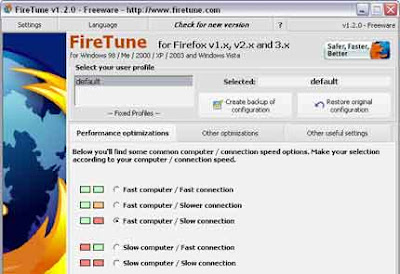
FireTune is a free software application to easily optimize several configuration settings for Firefox. According to your specific computer speed and internet connection speed, FireTune will optimize several internal settings of Firefox for better performance
FireTune does NOT modify the Firefox executable or any other Firefox binary file. Instead it automates the procedure of optimizing the browsers preferences.
How to tell whether Firefox is faster after optimizing itAfter installation, just follow these instructions:
- Clear the cache of Firefox from the Firefox settings dialog - this is very important!
- Before you optimize Firefox, navigate to http://www.numion.com/stopwatch/ and do a speed test on http://www.neowin.net
- The time needed to load the site completely will be displayed to you in the browser window. Write down the time
- Clear the cache of Firefox from the Firefox settings dialog again - this is very important!
- Start Firefox again, and repeat the speed test on http://www.neowin.net/
- Compare the displayed result with the result from the test before the optimization
- Repeat this three or more times
>>Requirements - Firefox v1.x / 2.x / 3.x.
>>OS: Windows 200 /XP/2003 (some system required VB6 run time to run it. Those files are usually pre-installed on Windows 2000/XP/2003. If you get an error message during startup, download and install VB runtime (http://download.microsoft.com/download/vb60pro/install/6/Win98Me/EN-US/VBRun60.exe)- (source)
. Read full story .
Wednesday, June 25, 2008 | 0 Comments
Firefox 3.0 Final launched today
Download English version from here/ other languages from here
. Read full story .
Tuesday, June 17, 2008 | 0 Comments
Popular Magazines for Free on your iPhone, Firefox and Safari
Following are some of the magazine available - U.S. News & World Report, Playboy, Popular Photography, Men’s Health, Popular Mechanics, PC Magazine, Elle, Technology Review, Macworld UK, Lonely Planet, Reader’s Digest, etc.To read the magazines you only need to enter your email address which then subscribes to their mailing list, and you’ll be able to view the full digital issues magazines.
To take advantage of this, on your iPhone just navigate to Zinio. In case you don’t have an iPhone but you’re using Safari or Firefox and want to take advantage of this, here’s how you change the User Agent:
For Safari Browser:
- Open Safari and go to preferences.
- Click the Advanced tab and check the box that says “show develop menu in menu bar”
- Go up to the Develop Menu > User Agent > Mobile Safari 1.1.3 – iPhone.
- Navigate to Zinio and start enjoying the magazines
- In the URL bar, enter "about:config"
- Right click anywhere on the page, go down to New and over to String
- You will be prompted to enter the preference name. Enter: general.useragent.override
- You will next be prompted to enter a "string value". Enter: Mozilla/5.0 (iPhone; U; CPU like Mac OS X; en) AppleWebKit/420.1 (KHTML, like Gecko) Version/3.0 Mobile/4A102 Safari/419 (United States)
- Once you have hit OK, you have morphed your Firefox into an iPhone mobile browser
Then scroll down to the "general.useragent.override" and right click it. Select Reset.
[Source : Cybernetnews / ismashphoe]
. Read full story .
Sunday, June 08, 2008 | 0 Comments
StatusbarEx – Lets you monitor Memory usage of Firefox
You will also get the network speed immediately, it is very useful when you are downloading something in the background, so you don't need to activate the download tools to find out the download speed, just look at the status bar.
This Firefox extension to let you monitor following information on the status bar:Memory status: Total memory / available memory on system, Memory that Firefox used. CPU usage of Firefox, Current network speed, and Last modified time of the page you are watching
. Read full story .
Tuesday, April 08, 2008 | 0 Comments
Xoopit - your digital life inside Firefox
You can also add Xoopit as iGoogle module, and only need to create an account costs nothing. Get the latest photos and videos to arrive in your inbox on your iGoogle dashboard.[source]
. Read full story .
Wednesday, April 02, 2008 | 0 Comments
Get the cache of Firefox easily with CacheViewer
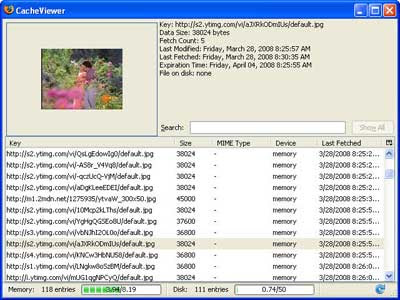
The easiest way to find Firefox cache is to write 'about: cache' in the address bar of Firefox and hit search, which shows the folder or directory system which is saved.Here is a simple and better method to view cache - CacheViewer, an extension for Mozilla Firefox that will enable us to navigate through the cache and even visually preview image files without leaving the window.
This extension is GUI Front-end of "about:cache"- allows searching and sorting memory and disk cache files. Just install the add-on, go to tools - click on 'Cacheviewer' to see saved files. We can preview, save or even delete files from here.(source-Genbeta)
. Read full story .
Friday, March 28, 2008 | 0 Comments
Firemonger - everything you need to start new maximum performance in Firefox and Thunderbird
The Firemonger Project is a Spread Firefox project, which provides a way for anyone to give Firefox and Thunderbird to their friends and family, on an easy to use CD. The CD contains the installers for Firefox and Thunderbird, along with a selection of some of the best themes, plugins, extensions and utilities for these two free programs. Users are guided through the installation and have the opportunity to read Firemongers easy to understand quick-start guides, as well as install extras such as themes and extensions.Firemonger is completely free to download and does not contain any malicious or invasive programs such as spyware or adware (this has been confirmed by softpedia).
Download
. Read full story .
Monday, March 17, 2008 | 0 Comments
Firefox 4 Pre Alfa 1 available for download
As we await the final version of Firefox 3, Firefox 4 Pre-Alpha 1 (Minefield) is already available for download on Mozilla’s FTP server. This is a 'launch' surprise and seems that it has been designed to get attention that the Internet Explorer 8 Beta 1 already have.The download is available for Linux and Windows as a package and installer. That does not alter the current efforts to focus on completing the version 3 of which should be launched before the summer.
Without that still have clear objectives, rumors abound that Firefox 4 will be built from scratch, focusing on improving the performance-weak point so far-reaching and could not be consistent with the themes and extensions today.[via]
. Read full story .
Monday, March 10, 2008 | 0 Comments
How to Configure Firefox to free Proxy server
A proxy server serves us mainly in two ways - It increases the network speed of our internet connection and hides our identity by hiding our IP address.
A proxy server (not every) save information and files that are requested by many other proxy users in a special database called "cache". When you request a web page behind a proxy, the proxy server first look into these "cache" and if the same information is found you will get it without a delay.
An anonymous proxy server hides our IP address and hides information about us and our interests. It is useful, for example, to overcome some restriction on users from certain countries, cities, geographic regions or even restrictions on some IP address. So a proxy can be used for browsing blocked sites like Flickr, MySpace or YouTube, etc.
Here is an example to use a free proxy server with Firefox.
- Firstly get a list of free proxy servers from here or here
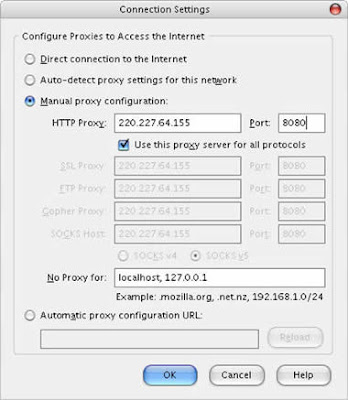
- Then choose an IP address and port address from the list (example: 220.227.64.155. and 8080)
- Now run your Firefox
- Go to-Tools-Options-Advanced
- Click on Network-tab then-Settings
- Now choose Manual proxy configuration. Enter the IP address in HTTP Proxy and Port address in Port. (Example: 220.227.64.155 and 8080 respectively). Also check the box 'Use this proxy server for all protocols'.
- Click OK.

Try different IP address and port address for different result. I found that some of them are fine and others give very bad results. And of course you can delete it if you don’t want.
>>Related Post- Surf faster than before
. Read full story .
Saturday, February 09, 2008 | 0 Comments
Get your bookmarked sites and other saved items from any computer
Google Browser Sync from Google Lab is an add-on for Firefox that continuously synchronizes browser settings – including bookmarks, history, persistent cookies, and saved passwords – across your computers. It also allows you to restore open tabs and windows across different machines and browser sessions.
To use this service, you need to install Browser Sync on every computer you want to access your browser settings and required Google account to configure it. Installation is simple, just like any other extensions that you installed before. Details…
It works with Firefox version1.5 and later.
. Read full story .
Tuesday, February 05, 2008 | 0 Comments
Bridge the Language barrier with Firefox
1. Quick TransLation – This is a very simple and easy language translator for Firefox. Simply select with your mouse any word and the translation will appear in a pop-up window. Just click on the flag icon and select the language you want to translate to.
2. Translator - Translator is web translation extension to Firefox that allows us to translate any web page into nearly any language at the click of a button and it supports the online translation service like Google translator, yahoo bablefish, Atlavista, etc.
3. Foxlingo – This is a multi purpose language tool and supports around 35 languages. Main Features includes - Web page translation - translates full web pages .Translated search - Searches foreign pages using terms written in your language, Auto Translation - Automatically translates websites by recognizing their domain, Text Translation - Translates text entered in the search box or selected on any web page, etc.
4. Gtranslate - With Gtranslate we can translate any text in a webpage just by selecting and right-clicking over it. The extension uses the Google translation services to translate the text.
. Read full story .
Monday, February 04, 2008 | 1 Comments
Read it later - Save pages of interest to read later

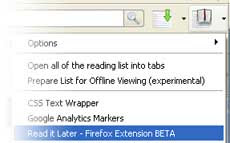
When you come across something you want to read later while browsing, simply click the ‘Read Later’ button and the page is instantly inserted into your reading list.
And just click ‘
. Read full story .
Saturday, January 26, 2008 | 0 Comments
Creates extra things in your Post with Write Area enabled by FCK Editor
Here I am talking about Write Area an add-on for Firefox enabled by FCK Editor. You may all hear about FCK Editor, an open source, web based fast and simple HTML editor which can be used to create tables in your blog posts, create list items, add Flash animations to posts without the complexity of HTML coding, and anything is easily possible with it.

Like that, Write Area will do everything, and as an add-on for Firefox it can be activated by right clicking from any text area boxes of any website or blog (see the image for example); that is text area provided by the "Edit Source" or "Edit HTML" feature. Just write or do what you want and click on ‘source’ button and select all (CTL+A) and copy (CTRL+C) and paste it.
Remember that Write Area is still in Sandboxed, means in beta stage and required registration with Mozilla to use it. While registering, you need to enable showing sandboxed plug-in in your user preferences otherwise you can’t download it.>>And if you want to use FCK editor to create your blog post, you can use their demo page.
Track - martinkou
Related post - Give your blog post a different look
. Read full story .
Thursday, January 24, 2008 | 0 Comments
How to change Firefox’s Tab bar to bottom

To locate chrome folder in Windows-XP (For other operating systems click here) navigate to
C:\Documents and Settings\[User Name]\Application Data\Mozilla\Firefox\Profiles\chrome
C:\Documents andSettings\[UserName]\ApplicationData\Mozilla\
Firefox\Profiles\uyd02yzv.dfault\chrome
[The application data file is a hidden file. To view this file go to Windows explorer (open My Computer) and select Tools - Folder Options - View and check Show hidden files and folders]
By default userChrome.css fie does not exist, so you need to create it before you can start adding your preferences. There's actually an example file that exists by default, called userChrome-example.css. You can just rename that file by removing the -example part. Then open this file in notepad or any other text editor and add the following code and save it.
/* Display the tabbar at the bottom */
#content > tabbox { -moz-box-direction: reverse; }
Restart your Firefox and see the difference
You can also move the tab bar to your left or right too.
. Read full story .
Thursday, January 17, 2008 | 0 Comments
Google calendar in Firefox sidebar
By just book marking Google Calendar (right click the link and select bookmark) and selecting ‘Properties’ (right clicking on the book mark) and choosing “Load this bookmark in sidebar”, you are able to access Google Calendar and upcoming events on Firefox sidebar without going to a new web page.
Tips: To bookmark Google calendar, load the page first by clicking this link in your browser (JavaScript should be enabled) then bookmark the page.Track - firefoxfacts
. Read full story .
Tuesday, January 15, 2008 | 0 Comments
Firefox 3.0 Beta 2 released with new features
It has many improvements over its previous version, for example, if you click on favicon (shown on address bar) you will get the details of that web site like, its owner, is this web site is stored our information, previously visited etc.
It has redesigned location bar auto complete menu, which now highlights which parts of the page title and/or URL m
atch the entered text.
Every Firefox user may familiar with the pop up window asking to remember password when logging in. Now it is gone away, instead, like Internet Explorer information bar appeared only after you are successfully logged on.
Its download manager also has some additional features like pause, stop, information and ‘retry’ buttons and I think the downloading speed has also some improvements.
It has additional feature which shows all plug-in on your browser like Microsoft DRM, etc.
Like before, Firefox comes with a simple interface, including popup blocker, tabbed browsing and improved privacy and security.
. Read full story .
Thursday, December 20, 2007 | 0 Comments
Firefox unable to play background sound embedded on a web page
Some websites have background music embedded on their web page and that coded only for Internet Explorer. So, some of you may have face a problem that unable to hear background sound when you browse such a site with Firefox. Here is a solution for that. Firstly install the Greasemonkey extension from Mozilla- add-on site.
Then install the user script from Userscript.org in to Greasemonkey. Now you will be able play embedded sound in Firfox.
. Read full story .
Thursday, November 01, 2007 | 0 Comments
Prism – Allows to run web applications on desktop environment
(Via Mozilla labs)Mozilla is developing a new application called ‘Prism’ that lets users to add their favorite web applications like GMail to their desktop environment and can be access them just like other desktop applications.
Mozilla is developing this new technology on web platform and makes to integrate the functionality into Firefox, so any one can easily add a web application on their desktop.
And because of web platform, ‘Prism’ supports rich internet technologies like HTML, JavaScript, CSS, and supports Windows, Linux or Mac operating systems.
Mozilla Labs wrote “And while Prism focuses on how web apps can integrate into the desktop experience, we’re also working to increase the capabilities of those apps by adding functionality to the Web itself, such as providing support for offline data storage and access to 3D graphics hardware” (News via Mozilla labs)
For more details and download click here.
. Read full story .
Wednesday, October 31, 2007 | 0 Comments
Mr. Uptime watches Web Sites when they are go down
fox browser that will keep trying to reach the website in the background while you continue surfing on other websites. When the website is accessible again, Mr Uptime will let you know. You can also use Mr Uptime when a website responds but doesn’t load correctly. Mr Uptime watches when the server status code changes from an error to OK. It checks the websites on every 5 minutes for the first 60 minutes. Every 10 minutes for the next 120 minutes. Every 15 minutes for the next 180 minutes. Every 30 minutes for the next 240 minutes or every 60 minutes after that.
You can set how long you want to keep checking a website. After this time it will be removed from the watch list even if it hasn’t become available. Read full story .
Tuesday, August 14, 2007 | 0 Comments
Add various web developer tools to Firefox
This add-on provides extensive information about page elements, color, link details or attributes and allows you to validate CSS, HTML code; RSS feed or links of a page by validation link.
Web masters can use it to make more attractive web page. It provides a ruler utility to measure anything on a page and allows linearising a page or hiding the background.
. Read full story .
Thursday, July 05, 2007 | 0 Comments