October 31, 2007

Prism – Allows to run web applications on desktop environment

(Via Mozilla labs)
Mozilla is developing a new application called ‘Prism’ that lets users to add their favorite web applications like GMail to their desktop environment and can be access them just like other desktop applications.

Mozilla is developing this new technology on web platform and makes to integrate the functionality into Firefox, so any one can easily add a web application on their desktop.
And because of web platform, ‘Prism’ supports rich internet technologies like HTML, JavaScript, CSS, and supports Windows, Linux or Mac operating systems.

Mozilla Labs wrote “And while Prism focuses on how web apps can integrate into the desktop experience, we’re also working to increase the capabilities of those apps by adding functionality to the Web itself, such as providing support for offline data storage and access to 3D graphics hardware” (News via Mozilla labs)

For more details and download click here.

CSS scroll bar color changer

CSS scroll bar color changer is an online tool that lets you to customize the colors of the scroll bar on your blog or web site. Working is simple enter your colors in hex format, (e.g. FF0033) or click the color chip for a popup color picker. Copyand add the resulted code CSS between the body tags.(Support only Internet Explorer)

License: Free
Requirement: Internet Explorer

October 29, 2007

Search Engine Spider Simulators for Search Engine optimization

A web site’s or blog’s popularity depends mostly on search engine optimization (SEO). Because, many studies shows that majority of the web users are search-dominant. They come to the site through the links listed by the search engines as a result of their query.

Spiders / Robots / crawlers, are used by search engines like Google or Yahoo to crawl the Internet and stores information like titles, keywords and descriptions found in Meta tags, web page content, images, external links etc. Basically all your pages should be visible to crawlers, or they will not be listed.

In a web page, there are many contents and Links displayed may not actually be visible to the Search Engines Spiders. For example, Flash based content, content generated through JavaScript, content displayed as images etc. So it is very important to take extra care while adding Meta tags, title or content of a web page.

Search Engine robot is a software application designed to visit websites to index their content. It differs from human visitors and it is possible that some of your pages will not be found. So you should evaluate your web site by performing a crawling action with a search engine spider simulator.

There are many free online Search engine Spider Simulators and simulator software are available. (Just search with the key word ‘Search engine Spider Simulator’ to find)

Search engine Spider Simulators checks if your site can be crawled by search engines. It will give you an idea how search engine see your page, and give you additional comments and suggestions in case it found a problem related to the crawling of your site. And also show how your site will be displayed in search engines listings.

I would suggest that you should check with different simulators to find a good result. It was found that some online simulators have selection for different Spiders (Yahoo, Google, and MSN) that is a better choice.

A new look for your Feed Icons

If you like to have a new look for your feed icon visit Zeusboxstudio.com. There you can download a set of feed icons in 32 and 16 pixel sizes. All icons are in PNG format and are free to use.Here is another one which include standard and colored feed icon. Package includes 50 12x12 colored icons based on Adobe Photoshop's default color palette.

And if you want a web2 style feed icon visit this link

Here is an online RSS button maker. You can create your own RSS styled buttons there.


October 27, 2007

Fully automated backup system for your critical data

It is very important for a business to back up all critical data. A system crash may cause for loss of all valuable information. For a peace of mind, a safe and secure, fully automated backup system should require.

FileFort is an easy to use file backup program for Windows that will automatically backup your critical data to virtually any type of storage media -To a Network Drive or another hard disk, Burn to a CD, DVD or Blu-ray disk, or Upload a FTP Server.

FileFort allows complete control over your backups. You can set your files to automatically or manually backup to a specified location. You can also schedule regular back times by date or time.

FileFort is free and a very small application, just 145kb in size and installation is also simple. The application includes a help file, which makes your job easy.

(The software is from NCH software, creator of popular ‘Wavepad audio editor’)

Visit the Home page for Download

System Requirements:

>Windows NT/2000/XP/2003

>CD, DVD or Blu-ray burner (Optional).

>Internet access for FTP transfer or automatic emailing (Optional).

October 26, 2007

Check your Email from anywhere with out any email client

DWmail is an online email application that allows you to check, manage and send email from POP3 or IMAP4 email accounts.

With DW mail you can access all your, work, home, school emails from anywhere in the world and at any time without the need for software such as Outlook.

The service is free and no registration is required. DWmail does not make use of cookies to remember you; instead use some unique identifying method. DWmail has also some in- built protection against spam.

Full details…

Contactify – Email without an address


Contactify turns your email address in to a URL. You can use this URL on your blog or any web page so that email crawlers can’t trace your email. That is Contactify provide a way for others to contact you without presenting an email address on your site. So it reduces receiving spam letters.

Contactify is the best, fastest and easiest way to allow people to contact you online, whilst never revealing your email address.


October 24, 2007

MRI scan for web developers

MRI is a free cross browser tool like X-Ray that lets you test selectors with any web page. Selectors, particularly complex ones can be difficult to get exactly right - MRI lets you experiment with them on any web page - static or dynamic.

Just bookmark the tool. Load a web page fully, then load MRI and enter a selector (e.g. li a) to test.

MRI currently works with Safari 2/3 on Mac OS, Mozilla browsers (Firefox/Camino) on Windows and Mac and Internet Explorer 6+.

Related story: Take X-Ray of a web page

Photoshop Secret Shortcuts at Webdesignerwal


By using software shortcuts you can boost up your work. At Webdesignerwall you can see some secret Photoshop shortcuts which are not documented in the menus. All shortcuts are quite useful for speed up your works.

For example:

>To scale the font size - increase or decrease, press Ctrl + Shift + > or <.

>To set the Layer opacity or selected Brush opacity, press the number keys (1=10%, 2=20 %....) to adjust opacity.
You can find such 30 tricks there

October 23, 2007

Convert ReStructuredText (ReST) to HTML or PDF online


ReStructuredText (ReST) is a lightweight text markup for writing documentation. ReStructuredText to anything (rst2a.com) allows you to convert ReST to plain text that can be read and edited anywhere, in HTML, the universal language of the web, or in PDF, a format created for documents you want to print out and hold in your hands.

ReStructuredText is an easy-to-read, WYSIWYG plaintext markup syntax and parser system. It is useful for in-line program documentation, for quickly creating simple web pages, and for standalone documents. (Details)

Flickr photos under Creative Common license

Find good work of Flickr users under Creative Common license. Many Flickr users have chosen to offer their photographs under a Creative Commons license (Creative Commons is a non-profit that offers an alternative to full copyright), and you can browse or search through photos.

October 21, 2007

Free Online PDF converter

Since its introduction, the PDF has been the most preferred file format for storing documents electronically.
The major benefits of using PDF are that you can combine and store various file formats in to a single file and allow easier sharing of files.

There is lots of software available, like PrimoPDF for PDF conversion. If you don’t want to download and install software, here point out some best free online service for you.

1. Neevia Document Converter: Easley convert any documents to PDF. Choice for add water mark and encryption and option to select compatibility.

2. PDF Online: Convert any format to PDF. MS document, PowerPoint (PPS/PPT), excel, JPEG, BMP, PNG, TXT etc.

3. Primopdf: free online service for converting doc file to PDF document

4. Expresspdf: convert your Microsoft Office documents (Word and Excel) and any web page to PDF

5. Freepdfconvert: convert MS Office, Images, Web Pages, Vector Graphic Formats files to PDF

6. Zamzar: A free service for file conversion. Convert files between any formats

Web Page to PDF Converter - useful for printing and saving a web page

7. Html2pdf: Renders URLs of (dynamic) (x) html pages including CSS to PDF on the fly

8. Easysw: Enter a URL of a web page to be converted to PDF

9. Html to PDF: export your web pages to PDF documents

10. RSS to PDF: Free Online RSS, Atom or OPML to PDF Generator


October 19, 2007

Amazing Microsoft Silverlight desktop wallpapers

Download amazing, free Silverlight wallpaper from Microsoft. You can select two enchanting design for your desktop and suitable for standard and wide screen monitors.

Supported operating systems are - Windows 2000, Windows Server 2003, Windows Vista and Windows XP. Also supports Apple Mac OS X.

Related Post - Silverlight Wallpaper Generator

October 18, 2007

A database for people

Spock is the leading people search application. The site has indexed millions of names in its database and expanding further by invitation.

You can join there to contribute. Every person has been provided with a profile page, classified with tags like journalist, musician etc. and a links to where they are on the web.

Spock organize people information like this - “search for information on bio pages, social networks, news sites, blogs, directories ...pretty much every place imaginable on the internet.

Second, the Spock community contributes information to help enhance the search experience. Members can add tags, pictures, and web links or simply vote on existing information to increase its relevance’.

Anyone can join to help make search better for everyone.

October 17, 2007

Google Image Labeler - Another feature from Google

Google Image Labeler is a new feature of Google Image Search that allows you to label random images and help improve the relevance of image search results so that you and other Google users can quickly and easily find the results you're looking for?

Working is like this- “Each user who wants to participate will be paired randomly with a partner who's currently online and also using Google Image Labeler. Over a 90-second period, both participants will be shown the same set of images and asked to label each image based on what they see. They'll also be shown words that can't be used as labels. Both participants can add as many labels as they want until one of them matches a partner's label. After there's a match, they'll see a new image and continue the cycle, until time runs out. Contributors will also see points they've earned throughout the session”.

More information…

October 16, 2007

Test your Web design in different Browser and Operating system

Testing a new Web site in many browsers and Operating system can be quite time-consuming and not everybody has a farm of legacy machines with older OSes and browsers.

Browsershots is a free, open-source online service that makes screen shots of your web design in different browsers and Operating systems. When you submit your web address, it will be added to the queue for process. Later you can access the page (after 10 minutes or so) with many screen shots. You can bookmark the page for later access.

October 15, 2007

Make photo galleries from your home video

Free Video to JPG Converter is an ideal tool to make photo galleries from your home video. Extracted image quality is good and it is very fast and easy to use.

The installation is simple and the interface is rather simple and self explaining.

Click the button to select an input video file on your computer. And choose a location to save your snapshots (default C:\Temp). Set what video frames you want to save as snapshots. That is every 100th video frame or frames in every 10 seconds or just every frame. (Remember that ‘every frame’ option makes the total size of the extracted images may be bigger than the input file size).

Use the navigation line and ‘trim left’ and ‘trim right’ buttons to select a part of the video to extract. You can make a snapshot of the current cursor position by clicking the ‘Make Snapshot’ button in the left bottom corner of the interface.

License: Free

File size: 4.7Mb

Home page for download

Removing Index.dat file in Windows

Index.dat files records all details of your internet browsing habits and you can’t uninstall them in a normal method. Even deleting cookies and internet history files retains these index.dat files.

Here discussing two methods for completely removing Index.dat files.

1. In Windows XP, while booting your computer select ‘advanced booting’ option by pressing F5 or F8 on the key board. Select ‘Safe mode with command prompt’ and log in as Administrator. Now go to root directory and type in “delindex.dat /s” which will delete all Index.dat files.

2. You can delete Index.dat files very easily with a small utility Delete doctor. The software is very small, below 100kb in size and no installation required. Just run the exe file and select the root directory of all Index.dat file (example: ‘my document and settings’) and schedule for deletion upon system restart.

You can also delete other files like files left by Trojans or corrupted files. Select a file to delete from the built-in file browser or drag a file to the application's icon or window from Window's Explorer.

License - Free

Home Page

Download

October 13, 2007

Free Flag Icons for download

Flag icons may be very useful to use in a web site to show your country and location. Following are a list of site where you can download free flag icons in different sizes, as favicon or animated.

1. Icondrawer - More than 220 free flag icons representing countries and unions all over the world in PNG format and sizes in 16x16, 24x24, 32x32, and 48x48.

2. Flag favicon icon - These world flag icons can be used to spruce up your web pages as favicons. The icons are in 16X16 and 16 colors. The icons are original work and free to download, use and modify any way you like.

3. Jfitz - good set of small, consistent flags collection. Free to copy these flags for personal or professional use

4. Famfamfam – More than 240 icons in GIF and PNG formats representing most countries in the world as small pixel icons. These flag icons are available for free use for any purpose with no requirement for attribution.

5. Jacorre - a set of 174 free 27x17 pixel flag icons with transparent backgrounds. Free to use these icons on websites, forums, blogs, etc.

6. Free World Wide Web Flag icon - Use the flag icons in your email signature.

7. Free Flag icons – use in any websites and show your country location with an icon.

8. Lirent - More than 220 free flag icons representing countries and unions all over the world in PNG format. Sizes: 16×16, 24×24, 32×32, 48×48.

9. Flag icon on folder - Here you will find Flag Icons from all over the world, as well as folder icon with flags on them.

10. Animated World Flags – Animated flag. Choose flags by country for download.

11. World flagsDirectory - Find different sizes and designs of each country flag


October 11, 2007

Handbrake for Windows

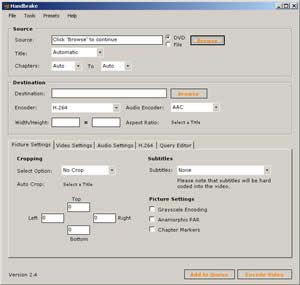
Handbrake is a great, open source application that can convert DVDs in to whatever format you want. You can convert DVD in to MP4 with ACC audio for mobile phone, H264 video with ACC-LC audio for IPOD, Xvid etc.

Handbrake on the Windows Platform does not decrypt commercial DVDs. For that you have to require using programs like DVDShrink or AnyDVD to rip your DVD first. Then handbrake re-encodes it to a format of your choice.

Using this program is very simple.

>Select a DVD file by clicking on ‘browse’ button (for ISO image or mpeg file, select ‘File’ radio button).

>Select a title and chapter for encode or leave it ‘auto’.

>Select a destination path to save the encoded video.

>Select an encoder type for video and audio or preset encoder from the preset menu that will do all the required settings.

> ‘Croping’ menu lets you crop the image to get rid of the black bars that will reduce the file size further.

> It also lets you choose options as to how you want it encoded from the Picture setting option.

License: GPL, File size: 3.2MP

Requirements: .Net framework 2, Windows 2000 and XP

Download

Good bye to passwords


I am sure that many of us have lot of web account and different password for security, but it is difficult to by heart every password and may be confused with passwords. By using to sign in to all your favorite websites using a single user name and password is convenient, but security becomes questionable.

Here comes MyVidoop. It promises a free, convenient, and secures single sign-on to the web, supported at any OpenID-enabled web site.

MyVidoop uses Vidoop Secure technology - an image-based login technology that eliminates passwords and helps defend against prevalent forms of hacking Using image categories, it draws your eye to your personal images to deliver a one-time access code that only you can interpret, just in time for login.

You can control your own experience and security with myVidoop browser integration features, your online identity becomes easily manageable from anywhere, anytime. Currently it supports only Internet Explorer and Firefox.

‘Furthermore, with Vidoop Text-Ahead, Notifications, and the Activity log, myVidoop gives you more control over your account than any other identity provider. While many services still rely only upon a password, myVidoop eliminates passwords, replacing them with a more secure two-factor alternative’

Bypasses Flickr.com filter in Iran, UAE, Saudi Arabia and China


In countries like UAE, Iran or Soudi Arabia, where Internet filtering/ censorship is applied, it is so hard to get their favorite sites like Flickr .com. Access Flickr is a Firefox extension launched by Hamed Saber enables to circumvent the flickr.com filter.

Access Filter bypasses the flickr.com filter in Iran, UAE, Saudi Arabia, China and other banned countries. All you have to do is install Access Flickr and restart your browser. There is no configuration, no menu, and no icon. All needed configurations are done automatically. After restarting, you can access flickr.com, without any restriction”

Requirements: Firefox: 2.0a1 – 3.0a5

October 9, 2007

Monitor bandwidth usage of BSNL DataOne Broadband

DataFox is a Firefox add-on that checks your bandwidth usage of BSNL DataOne and MTNL TriBand broadband internet connection. The progress bar gives you an idea of the amount of bandwidth from your monthly limit already consumed thus control your usage.

The importance of this extension is that you need not take time every day to log in to the usage site to know your bandwidth usage, just click on a button that will show the relevant info in your status bar.

‘DataFox works by obtaining usage information directly from the BSNL / MTNL usage site, it does not monitor your network in any way, so usage details probably won't change until you logout of DataOne / TriBand and log back in again. BSNL users may want to use the Override default domain option in the login dialog in case the BSNL server you are being directed to is not responding. MTNL users, if the usage server is down, DataFox will not be able to fetch any usage records.

DataFox has been tested with Firefox versions 1.5, 2 & 3.

More information, installation and download

Tips for Installing Blogger template

Even though many of you already know how to install blogger template, here point out some important tips. Please read it.

1. Before installing new template save your old template by downloading it on your computer. (Layout – Template – Edit HTML- Download full template)

2. For installing XML template (new blogger) do not copy paste, only upload from your computer. (Edit HTML – Browse – Upload).

3. After installation, it may ask you to delete some widgets, just delete them.

4. In some case you can’t save the template. This is simply because of more than one unique Id on your template, For example Label list, HTML, Adsense etc. In that case, go back to your old template, click on ‘Page elements’ and delete all widgets (later you can add it).

5. You can delete only the widget that causing problem, if you note it while installing new template.

6. Many blogger templates includes images, like header background image, icons, main background image etc and are stored on sites like Imageshack, Flickr, etc. There is no guarantee to access these images properly in some locations of the world. So it is better to upload all these images in some convenient locations like Google Pages?. (Get the image URLs from the xml code and download all images. Upload (Google Pages?) and change the URLs accordingly).

If you have any doubt feel free to contact me
Subscribe to RSS feed for updates

October 7, 2007

Open source video player and internet TV

Miro is a free, open source, application that turns your Computer in to an internet TV and video player. You can play virtually any type of video file-WMV, XVID, AVI, FLV, QuickTime, MPEG and more. Miro allows search, watch internet TV and download video from sites like You Tube. It gives you access to more free HD content than any other video player.

Formerly known as Democracy Player, Miro has the following features

1. Play virtually any video file -WMV, XVID, AVI, FLV, QuickTime, MPEG, etc

2. Download YouTube video - Search, download and save video from You Tube, Google Video, Daily Motion etc

3. Download any Bittorrent file fast and watch that video in the same application.

4. Free Internet TV - Subscribe to any video RSS feed, podcast, or video blog. Explore and subscribe to over 1,500 free channels with the built-in Channel Guide.

5. HD video - Miro gives you access to more HD content than any other video player
License - GPL; File size - 22Mb
Download for Windows, Linux, Mac

Search Engine for Rapidshare


Rapidshare1 is a search engine for Rapidshare files. The search engine searches on sites, forums, message boards for Rapidshare file links. . This site does not affiliated with Rapidshare.de or other Rapidshare site with different tld.

Share your documents with Adobe Share


Adobe’s Share beta is a web-based service that allows you to upload and share files. You can share your documents online, send documents without e-mail attachments, embed your documents in WebPages and access your documents from anywhere with Adobe Share.

You can distribute the URL for the file to a selected number of users, post the link for the URL on a website, or embed the code for previewing the file in a web page. You have the option to allow recipients to invite others to view your shared files or limit access to only the specified recipients.

Using Share enables you to upload and share large files with others without attaching the files to an email message. Users have access to the latest version of the files through Share. It also enables the recipients to preview PDF, JPG, GIF, and PNG files using the web browser before downloading them.

October 5, 2007

Internet Explorer 7 opened to all -No WGA validation check

The latest version of Internet Explorer 7 (build 7.0.5730.13) does not require Windows Genuine Advantage validation check. Now it can be install on all copies of Windows whether it is pirated or genuine.

"Because Microsoft takes its commitment to help protect the entire Windows ecosystem seriously, we’re updating the IE7 installation experience to make it available as broadly as possible to all Windows users. With today’s "Installation and Availability Update," Internet Explorer 7 installation will no longer require Windows Genuine Advantage validation and will be available to all Windows XP users. If you are not already running IE7, you can get it now from the Internet Explorer home page on Microsoft.com, get a customized version from a third-party site, or, if you haven’t already received it via Automatic Updates, this version will be delivered to you as we described previously. If you are already running IE7, you will not be offered IE7 again by Automatic Updates,"

News source from Softpedia


Firefox add-on for YouTube

YouPlayer is a Firefox add-on that will let you play YouTube videos in a special sidebar. You can add name and URL of the video link in the play list of YouPlayer by copy-paste from YouTube. When you double-click on it, it will be shown in the video window.

You may drag a link to a browser window or right-click it and open in a new tab. You may also bookmark other links, but only YouTube links will be shown in the video window.

Requirements: Firefox: 1.5 – 2.0.0.

YouPlayer Features and Download

October 4, 2007

Free Blogger templates for download

Following are a list of free blogspot templates. It includes web2 style blogger templates with large footer, 2colunm and 3colum blogspot template in XML and XHTML (new or classic) etc. If you have little knowledge about HTML you can make it beautiful.

1. Web2 style template – Beautiful web2 style XML blogspot templates in 2colunm and 3colunm for download.

2. XML templates - More than 50 beautiful XML templates for download. All templates extremely customizable

3. XHTML Templates - More than 50 different types 2colunm and 3colunm XHTML template for classic blogger.

4. 3Colunm XML templates- Templates all are converted to 3 colunm from regular blogspot templates for new blogger

5. XML Templates from Noipa.org - 3Colum XML templates for new Blogger.

6. K2modify - many professional styles 2colunm and 3 column blogger templates

7. Freshblogger templates - Beautiful XML templates in 3colum and 2colum and web2 style for new blogger account.

8. Templates from Ehsany - Many templates are available for free download.

9. Free Templates - collection of Blogger Templates ranging from 2 Column and 3 Columns. XML and old HTML4 templates.

10. Templates for Old and New bloggers - The site hosts a huge collection of free blog templates for new and classic blogger

11. Blogcrowd – Template Styles: 3 column, 2 column, light, dark, blue, pink, green, red, orange, yellow, brown, gray, minimalistic, artistic, monochromatic, web2.0 and niche

12. Pyzam – make some awesome looking blogs using their template layouts

13. Free templates design – Free classic templates for download

14. Savatoons – A set of different style template for download

15. Freshblog beta Templates – Good looking blogger template and is compatible with blogger beta.

-Related Posts for Blogger Template-
  • 10 Resources for Classic (xhtml)Template for Blogger
  • Wordpress Gossip city Template for Blogger
  • Rounded edge Beautiful Template for Blogger
  • Mind breke-bueatiful xml template for blogspot
  • October 1, 2007

    Improve your hard disk’s performance

    To improve your system performance Hard disk should be tune up properly. If your hard disk is fully loaded with large amount of data it struggles to keep pace with other components. There is lot of software available for tune up HDD, but here I am not mentioning about software.

    Remember that old computers with less than 256MB of RAM should not try this. The method is optimizing memory to handle the ‘interrupts’ emerged due to the HDD. You can configure the buffer to optimize the memory.

    Go to Start - Run - type sysedit and hit enter. This will open System Configuration Editor. Now you can see four windows open namely- System.INI, Config.SYS, WIN.INI and Autoexec.Bat. Now expand System.ini window and look for [386enh]

    Now place the courser after it and press 'Enter' button on the keyboard to create a new row under it. Here type Irq14=4096 (These letters are case sensitive so enter it exactly as shown).

    Now go to File and save the configuration. Close the System Configuration Editor and restart the

    computer.

    All in one file converter

    Youconvertit is a very useful site where you can convert files like Document, Audio, Image, Video or Units to any format.


    You can convert document to DOC, PDF, HTML, ODP and many more, Video in to 3GP,AVI, MOV, MPEG, FLV etc, Image to ICO, BMP,JPEG GIF etc. This site is surely a very useful one. Upload any format, image, documents, audio & video without buying or installing anything on your PC.

    Home Page

    License – Free.

    Requirement – No requirement

    Intelligent Image Resizing

  • 1.Rsizr:
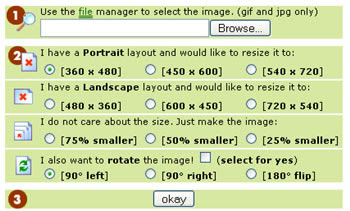
  • Rsizr is a fast and good online application for image resizing. It is based on flash and lets you resize your images fastly on your computer. Currently it supports JPG, PNG and GIF images only. In addition to normal image rescaling and cropping, you can also resize images using a new image resizing algorithm called seam carving that tries to keep intact areas in your image that are richer in detail.

  • 2. Resze2mail:
  • Resize 2 mail is an online image resizing tool which is quite useful to anybody who quickly wants to resize a digital image for email or publishing on a web site.Resized images can be saving on your PC and email it to friend, family, colleague or office.

  • 3. Picrease:
  • Picrease is also a free online picture resizer that allows you to resize or crops your images online for free. You can also add some special effects to your images and can be saving in to JPEG, GIF or PNG format.

  • 4. Mypictr:
  • Here is another one, Mypictr, which is quite simple and option to resizing images for different sources like blogger.